

Common Apollo Group TV Login Problems
Credentials not accepted
Apollo Group TV credentials are case-sensitive. Make sure you're entering the username and password exactly as provided, without trailing spaces.
Server not connecting
Apollo Group TV servers can experience downtime. If the server is unreachable, there's nothing you can do on your end except wait for the service to come back online.
Subscription expired
Your Apollo Group TV subscription may have lapsed. Contact their support to renew, or compare an alternative such as Tivimate IPTV, whose support runs on WhatsApp 24/7.
No EPG / TV guide showing
Apollo Group TV EPG can be inconsistent. Tivimate IPTV supplies Electronic Programme Guide data with the subscription.
How Does Apollo Group TV Login Work?
Apollo Group TV does not hand out an Xtream Codes login or an M3U playlist link for third-party players. You install Apollo's own app on each device and sign in inside it with a username and password. That keeps setup simple, but it also means that when the app has a problem you cannot fall back to another player: the fix has to happen in the Apollo app or on Apollo's side. By contrast, our IPTV subscription gives you login details that you enter in the player of your choice.
Either way, the details come from whoever sold you the subscription, usually in the confirmation message sent after payment. That matters when something goes wrong: the seller is the only party who can see your account status, renew it or reset your password. Keep that original message somewhere you can find it, because almost every fix below starts with it.
What Do Apollo Group TV Login Errors Mean?
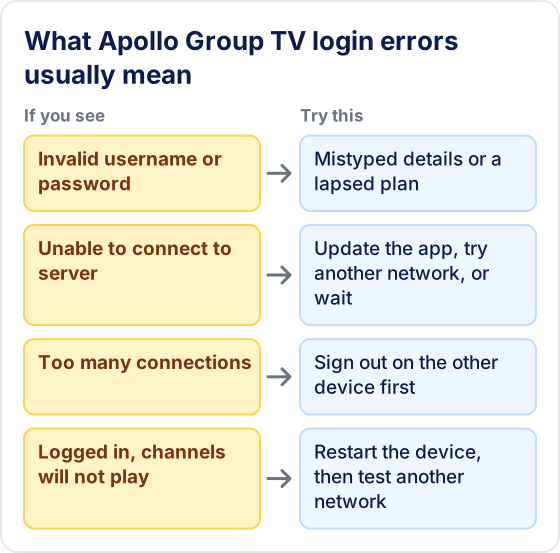
The wording varies between apps, but IPTV login errors fall into a handful of types, and each one points to a different cause. Match the message you see to the table before changing anything.
| Error you see | Usual cause | What to do |
|---|---|---|
| Invalid username or password / authentication failed | A typo in the username or password, a capital letter added by autocorrect, or a subscription that has lapsed | Re-paste both details from the original message; if they are definitely right, check your renewal date |
| Unable to connect / server not found | An outdated app version, a network that blocks the service, or a server outage | Update the Apollo app and try another network; if it still fails, wait and retry later |
| Account expired or disabled | The plan reached its end date or the account was suspended | Only the seller you bought from can renew or reactivate it |
| Too many connections / max connections reached | Another device on the same account is still streaming | Close the app on the other device, wait a minute, then sign in again |
| Login works but channels will not play | A player or network problem rather than a login problem | Restart the device, then test on a different network or a wired connection |
How to Do a Clean Re-Login
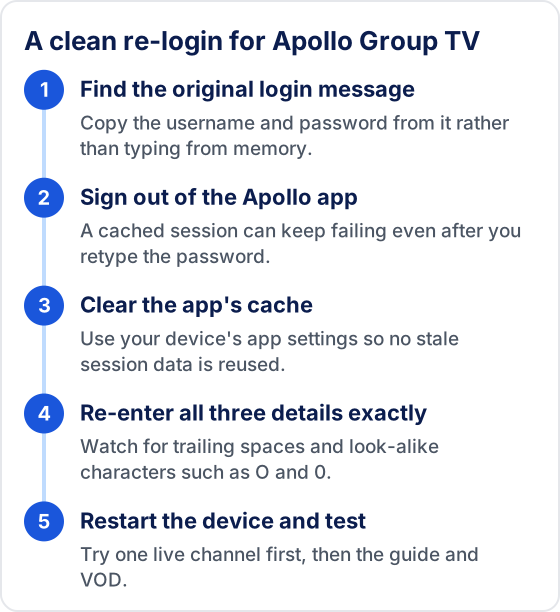
If the error points to your credentials, do not just retype the password over the saved login. The app can hold on to a cached session, so the same error comes back no matter what you type. Start from scratch instead:
- Open the original login message and copy the username and password from it.
- Sign out of the Apollo app, or remove the saved account if it offers that option.
- Clear the app's cache from your device's app settings, or uninstall and reinstall the app if your device has no cache option.
- Sign in again, pasting each detail and checking for trailing spaces and look-alike characters such as O and 0.
- Restart the device, then test one live channel before you open the guide or VOD.
Is the Problem on Your Side or Apollo's?
You can usually tell in about ten minutes by changing one thing at a time. The aim is to rule out your own device and network before you spend time waiting on the provider.
- Try a second device. Sign in on a phone or another TV with the same details. If it works there, the problem is the first device or its app.
- Try a second network. Use a phone hotspot on the device that fails. If it connects, restart your router before anything else.
- Check other streaming apps. If other apps also struggle, your internet connection is the bottleneck, not your Apollo account.
- Check when it last worked. A login that failed right after a renewal date usually points to the subscription; one that failed overnight with no changes often points to a server change.
If the same correct details fail on two devices and two networks, the issue is with the account or the server, and only the provider can fix it. Our Apollo Group TV not working guide covers buffering and black-screen problems that start after you are signed in.
How to Protect Your Apollo Account While You Troubleshoot
Login trouble is exactly when people take shortcuts that put their account or device at risk. A few rules avoid most of it:
- Do not paste your username or password into public forums or Reddit threads when asking for help, and crop them out of screenshots.
- Renew only through the seller you originally bought from. Pages and social accounts that use the Apollo name but are not your seller may simply take the payment.
- Do not install "fixed" or repackaged versions of IPTV apps from unknown download sites; reinstall the Apollo app from the source you used the first time.
- Ignore unexpected messages telling you to pay again to unlock your account unless you can confirm them with your seller.
Apollo Group TV vs Tivimate IPTV
See how the two services compare side by side
| Feature | Apollo Group TV | Tivimate IPTV ✓ |
|---|---|---|
| Live Channels | ~20,000 | 55,000+ |
| VOD Library | Limited | 180,000+ |
| Stream Quality | SD/HD | SD · HD · FHD · 4K |
| Customer Support | Ticket only | 24/7 WhatsApp |
| Free Trial | None | 24 hours, no card |
| Refunds | See provider | Limited — see refund policy |
| Contract | Required | No contract |
Why Compare Tivimate IPTV with Apollo Group TV
Bigger Channel Library
Tivimate offers 55,000+ live channels versus Apollo Group TV's more limited lineup — including international channels and 180,000+ VOD titles.
Instant Setup via WhatsApp
Subscribe to Tivimate and receive your Xtream Codes credentials via WhatsApp instantly after payment. No waiting, no back-and-forth emails.
Test Before You Pay
A 24-hour free trial with no credit card lets you judge stability during live sport yourself — a check Apollo Group TV doesn't offer.
24/7 WhatsApp Support
Tivimate support is on WhatsApp around the clock. If you've ever been stuck waiting on Apollo Group TV's support, this is a significant upgrade.
More Apollo Group TV Guides
Apollo Group TV Review 2026
Our honest verdict — pros, cons, stream quality, and whether it's worth the price.
Apollo Group TV Pricing & Plans
What it actually costs per month, device connection tiers, and hidden costs to watch for.
Apollo Group TV Free Trial
Does a free trial exist? The honest answer, plus how to test before you pay.
Apollo Group TV Not Working?
9 fixes for buffering, black screens, and outages — and when it's on Apollo's side.
Apollo Group TV vs Tivimate
Full head-to-head: channels, quality, pricing, support, and trials.
Frequently Asked Questions
How do I log in to Apollo Group TV?
Apollo Group TV is watched through its own apps rather than a third-party player such as IPTV Smarters Pro or TiviMate. Install the Apollo app on your device and sign in with the username and password from your account. If you're having trouble accessing your Apollo Group TV account, Tivimate IPTV is one alternative with 55,000+ live channels.
Why is my Apollo Group TV login not working?
Apollo Group TV login issues are commonly caused by an expired subscription, incorrect credentials, or server outages. If the problem persists, Tivimate IPTV offers a free 24-hour trial and 24/7 WhatsApp support.
Can I use my Apollo Group TV login on more than one device?
That depends on how many connections your plan includes. If you sign in on more devices than your plan allows, the newest login is usually refused with a connection-limit error. Close the app on the device you are not using, or ask your seller about a plan with more connections. Our Apollo Group TV pricing guide covers the connection tiers.
Will reinstalling the app delete my Apollo Group TV account?
No. Your account lives with the provider, not on your device. Reinstalling removes the saved profile and any favourites stored in the app, so keep your original login message handy to sign in again afterwards.
What is the best alternative to Apollo Group TV?
Tivimate IPTV is an Apollo Group TV alternative sold on this site, offering 55,000+ live channels, 180,000+ VOD titles, 4K on selected channels and 24/7 WhatsApp support — starting at $19.99/month with a 24-hour free trial and no contracts.
Ready to Switch to Tivimate?
Try Tivimate free for 24 hours — no credit card required. Full plans from $19.99/month.
55,000+ live channels · 180,000+ movies and series · 4K on selected channels · No contract · From $19.99/month