
TiviMate is a strong choice of IPTV player if you watch live TV on Android TV, Google TV or a Firestick. Its TV guide grid works like a cable box, it reads M3U, Xtream Codes and Stalker Portal playlists, and it ships no channels of its own. The free version covers one playlist and the guide; Premium adds multiple playlists, catch-up, recording and multiview. It has no iPhone, Apple TV, Roku or native Windows app, so mixed-device homes may prefer another player.
TiviMate
Verdict: TiviMate is one of the most widely used IPTV players for Firestick and Android TV boxes. Pick it if you mostly watch live channels on a TV with a remote and want a guide that looks like cable. Skip it if anyone in your home watches on an iPhone, Apple TV, Roku or Windows PC.
Suits: Firestick, Android TV and Google TV viewers who watch mainly live TV
What is TiviMate?
TiviMate is a media player for IPTV playlists, built for TV screens and remote controls. It is published by Armobsoft FZE. The app contains no channels or streams: it is empty until you add a playlist from a provider, in M3U, Xtream Codes or Stalker Portal format. The developer's own Google Play listing says the same: TiviMate is a media player only and a paid upgrade unlocks app features, not content. That is why TiviMate has no channel list of its own: the list you see is whatever your playlist contains.
Tivimate IPTV, the IPTV subscription sold on this site, is not the developer of the TiviMate app and is not affiliated with Armobsoft FZE. If you want to know whether the app is lawful to use, see is TiviMate legal in the US and Canada.
What do TiviMate Free and TiviMate Premium include?
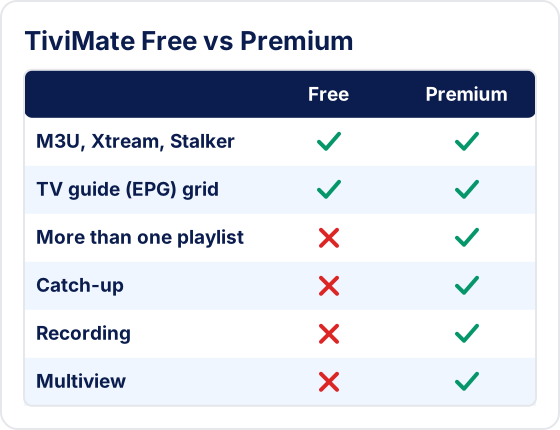
The free app plays one playlist with the full TV guide. Premium is a paid in-app upgrade that adds more than one playlist, catch-up, recording, multiview and backup. The developer's listing names these features without splitting them by tier, so confirm the current list on the Premium screen in the app.
| Feature | Free | Premium |
|---|---|---|
| Playlist formats: M3U, Xtream Codes, Stalker Portal | Yes | Yes |
| TV guide (EPG) grid | Yes | Yes |
| Live channels and VOD from your playlist | Yes | Yes |
| More than one playlist | No | Yes |
| Catch-up (needs provider support) | No | Yes |
| Recording to USB or local storage | No | Yes |
| Multiview (several channels on one screen) | No | Yes |
| Parental controls | No | Yes |
| Backup and restore of settings | No | Yes |
We do not quote a Premium price: it is set by the developer, it can differ by country and currency, and it changes. Check the current price in your app, in the Premium section of Settings (the menu may differ by app version). Our guide to buying TiviMate Premium covers the purchase steps for each device.
Which devices does TiviMate run on?
TiviMate runs on Android-based TV devices. It installs from the Google Play Store on Android TV and Google TV boxes, and by sideloading with the Downloader app on Amazon Fire TV, because it is not in the Amazon Appstore. There is no version for Apple devices, Roku, Samsung or LG TVs.
| Device | TiviMate? | How to install |
|---|---|---|
| Android TV / Google TV | Yes | Google Play Store |
| onn 4K Pro / onn 4K Plus | Yes | Google Play Store |
| NVIDIA Shield TV | Yes | Google Play Store |
| Chromecast with Google TV | Yes | Google Play Store |
| Amazon Fire TV / Firestick | Yes | Downloader app (not in the Amazon Appstore) |
| Android phone or tablet | Installs, not touch-optimized | Google Play Store |
| Windows PC | No native app | Android emulator only |
| iPhone, iPad, Apple TV | No | No version exists |
| Roku, Samsung and LG smart TVs | No | No version exists |
On a phone or tablet the app installs, but the developer states it is designed for remote-control navigation and is not optimized for touch screens. For every device in one place, see how to install TiviMate on any device.
What does TiviMate do well?
TiviMate's main strength is the TV guide. Channels and programmes are laid out in a grid you scroll with the remote, much like a cable or satellite box, which makes it easy to see what is on now and next across a large playlist.
- Built for the remote. Menus, the guide and channel switching are designed for a D-pad, not a mouse or touch screen.
- Customization. You can hide channel groups, reorder channels, set favorites and change guide and player settings. Our list of TiviMate settings worth changing first covers the useful ones.
- Premium extras for live TV. Catch-up, scheduled recording and multiview for several channels at once are aimed at people who watch live events.
- Three playlist formats. M3U, Xtream Codes and Stalker Portal cover most providers.
What are TiviMate's limitations?
TiviMate is Android-only, ships no content, and several of its best features depend on what your provider supports. Know these before you rely on it.
- No Apple, Roku or native Windows app. Mixed-device households need a second player anyway.
- The guide is only as good as the provider's data. Missing or wrong listings come from the EPG source, not the app. See why the TiviMate EPG stops updating.
- Catch-up needs a provider archive. Premium shows catch-up only for channels where the provider keeps past broadcasts.
- Multiview uses connections. Each panel is a separate stream, so it counts against your plan's simultaneous connections and your bandwidth.
- Recording needs storage. A Firestick has little internal space, so recording IPTV with TiviMate usually means a USB drive and an OTG adapter.
- Buying Premium on Fire TV takes an extra step. Fire TV has no Google Play, so Premium is bought through the separate TiviMate Companion app on an Android phone.
Who should use TiviMate, and who should pick another app?
Use TiviMate if you watch on a Firestick or an Android TV box and live channels matter more than on-demand movies. Pick a different player if you need iPhone, Apple TV or Windows support, or want one app across every screen in the house.
| You watch… | Better fit |
|---|---|
| Live TV on a Firestick or Android TV box | TiviMate |
| Live events and want catch-up or recording | TiviMate Premium (if your provider supports catch-up) |
| On iPhone, iPad or Apple TV | A player with an Apple version, such as IPTV Smarters Pro |
| On a Windows PC | A player with a Windows version |
| On a Roku, Samsung or LG TV | Another player, or a Fire TV or Google TV stick plugged into the TV |
How does TiviMate compare with IPTV Smarters Pro?
TiviMate is the more TV-focused player, with recording and multiview in Premium; IPTV Smarters Pro runs on more platforms, including iPhone, iPad and Windows. Neither app includes channels.
| Feature | TiviMate | IPTV Smarters Pro |
|---|---|---|
| Android TV and Firestick | Yes | Yes |
| iPhone and iPad | No | Yes |
| Windows | No (emulator only) | Yes |
| Recording | Yes (Premium) | Limited |
| Multiview | Yes (Premium) | Android and Fire TV |
| Includes channels | No | No |
For the other side of the comparison, read our IPTV Smarters Pro review, or compare the main IPTV player apps.
How do you set up TiviMate?
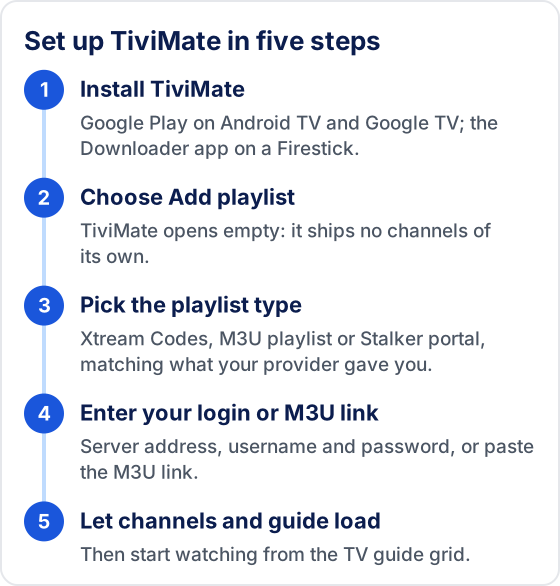
Install the app for your device, then add the playlist details your IPTV provider gives you. On a Firestick the full walkthrough is in how to install IPTV on Firestick.
- 1Install TiviMate from Google Play on Android TV, or with the Downloader app on a Firestick.
- 2Open TiviMate and choose Add playlist.
- 3Pick Xtream Codes, M3U playlist or Stalker portal, matching what your provider gave you.
- 4Enter the server address, username and password, or paste the M3U link.
- 5Wait for the channel list and TV guide to load, then start watching.
Each method is covered step by step in how to add a playlist to TiviMate.
Need a playlist for TiviMate?
TiviMate needs a subscription to show anything. Tivimate IPTV is one option; compare the plans before you choose.
Need a playlist for TiviMate?
Compare the plans