
An iPhone or iPad can play IPTV with a player app from the App Store — no jailbreak and no sideloading. The app is only the player: you add your own subscription to it with the details from your welcome message. One thing to know first: the TiviMate player is not available for iOS. It is an Android app by Armobsoft FZE (a third-party developer, not us), so on Apple devices you use one of the players below.
What You Need Before You Start
- ✓An iPhone or iPad on a recent iOS / iPadOS version. Each App Store listing shows the minimum version the app supports under Compatibility.
- ✓Your subscription details: the Xtream Codes server URL, username and password, or the M3U playlist link, from your welcome message. Xtream Codes vs M3U explains the difference.
- ✓Wi-Fi, ideally. Live TV uses a lot of data. On mobile data, check your plan's allowance first. The FCC's broadband speed guide shows how much bandwidth SD, HD and 4K video typically need.
Which IPTV Players Work on iPhone and iPad?
- ▸GSE Smart IPTV — long-standing iOS player that supports Xtream Codes logins, M3U playlists and external TV guides.
- ▸IPTV Smarters — the iOS version is listed in the App Store as Smarters Player Lite. It uses the same Xtream Codes login screen as the Android app.
- ▸iPlayTV — a paid player for iPhone, iPad and Apple TV that accepts M3U playlists.
App availability can differ by country. If an app is missing from your App Store, use one of the others. They all read the same credentials.
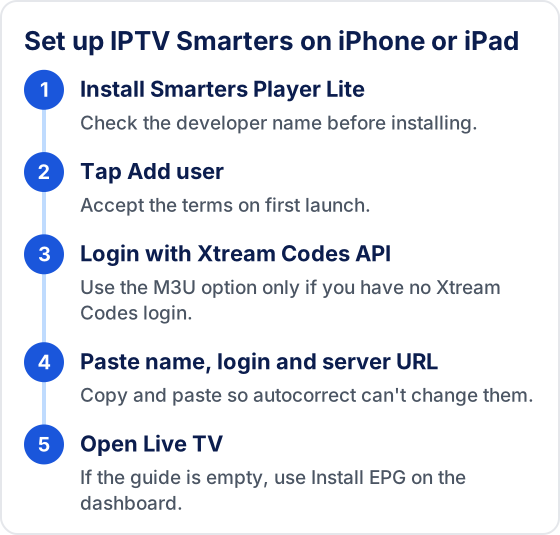
Method 1: IPTV Smarters on iPhone / iPad
- 1Open the App Store and search for "Smarters Player Lite". Check the developer name matches the IPTV Smarters developer before installing.
- 2Open the app and accept the terms on first launch.
- 3Tap Add user (or Add new user), then choose Login with Xtream Codes API.
- 4Type any name for the profile, then the username, password and server URL from your welcome message. They are case-sensitive. Copy and paste them to avoid typos.
- 5Tap Add user. The app downloads the channel list, movies, series and TV guide.
- 6Open Live TV to watch. If the guide is empty, use Install EPG on the dashboard.
Method 2: GSE Smart IPTV on iPhone / iPad
- 1Search for "GSE Smart IPTV" in the App Store and install it.
- 2Open the app and tap the menu (≡) in the top corner.
- 3Choose Xtream Codes API. If you only have an M3U link, choose Remote Playlists instead.
- 4Tap the + button and enter a name, the server URL, username and password (or paste the M3U link).
- 5Tap Save, then tap the new entry to load your channels.
- 6Open the EPG section of the menu to check that the TV guide has loaded.
Should You Watch IPTV on Wi-Fi or Mobile Data?
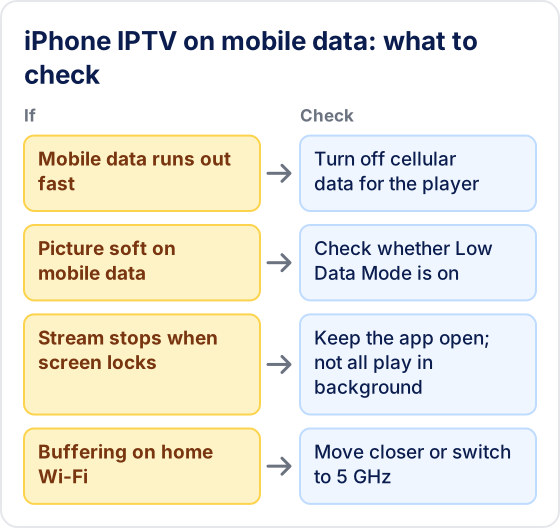
Use Wi-Fi whenever you can. Live TV streams continuously, so an hour of HD on mobile data can use a large share of a capped plan, and some carriers slow video on mobile networks. Mobile data is fine for watching away from home if your plan allows it, but set your iPhone up so it can't surprise you.
- ▸Block mobile data per app. In Settings → Cellular, scroll to the list of apps and turn the player off. It then only streams on Wi-Fi.
- ▸Check Low Data Mode. It sits under Cellular Data Options and also in each Wi-Fi network's settings. It can reduce streaming quality, which looks like a soft picture.
- ▸Keep the app on screen. Whether a player keeps playing when you lock the phone or switch apps depends on the app, so don't assume a stream will continue in the background.
Cast to Your TV from iPhone
Once IPTV is set up on your iPhone, you can send it to a bigger screen:
- ▸AirPlay: tap the AirPlay icon in the player if it has one. Otherwise use Screen Mirroring from Control Center to send the picture to an Apple TV or an AirPlay-compatible TV.
- ▸Chromecast: GSE Smart IPTV supports Chromecast — tap the cast icon in the player.
- ▸Better still: install the player directly on the TV device. See the Apple TV guide.
Troubleshooting IPTV on iPhone and iPad
❓ The app isn't in my App Store
Listings vary by country and apps are sometimes removed. Use one of the other players above. Avoid anything that asks you to install a configuration profile or a "signed" app from outside the App Store.
❓ Invalid login or authorization failed
Check the server URL (including http:// and any port number), and whether autocorrect capitalised the username. Also check you haven't reached your device limit. Full walkthrough: IPTV Smarters failed to authorize.
❓ No TV guide
Reload the guide from the app's EPG or settings screen and allow a few minutes. See EPG not working if it stays empty.
❓ Buffering, or sound with no picture
Players decode streams differently, so try the same channel in a second app. For buffering, work through the tips below and then how to fix IPTV buffering.
Performance Tips for iPhone and iPad
- ▸Use 5 GHz Wi-Fi. It is usually faster and less crowded than 2.4 GHz, especially near the router.
- ▸Close other apps and restart. Background downloads and video calls compete for bandwidth. A restart clears memory.
- ▸Clearing the cache means reinstalling. iOS has no per-app "clear cache" button. Deleting and reinstalling the player clears it, but you will have to add your login again.
- ▸VPNs cut both ways. A VPN can help if your network slows streaming traffic, but it adds latency and some services block VPN addresses. Compare with it on and off — see how a VPN affects IPTV.
Moving to a New iPhone or Adding an iPad
Expect to enter your details again. Restoring a backup reinstalls the player, but whether your saved login comes back depends on the app, so keep the server URL, username and password, or the M3U link, saved in Notes or your password manager. On a new device, paste them in rather than retyping.
The same login works on your iPhone, iPad and Apple TV at once only if your subscription allows that many simultaneous connections. If a second device shows an authorization error while the first is playing, close the player on the first device and try again. Delete the player from an old iPhone you are selling or giving away, so your login isn't left on it.
Frequently Asked Questions
Does Tivimate IPTV work on iPhone and iPad?
Yes. An iPhone or iPad can play IPTV with a player app from the App Store — no jailbreak and no sideloading. Install a player and enter the details from your welcome message. Each App Store listing shows the minimum iOS / iPadOS version it supports under Compatibility.
Which IPTV apps work on iPhone?
GSE Smart IPTV (Xtream Codes, M3U and external TV guides), IPTV Smarters (listed as Smarters Player Lite) and iPlayTV, a paid player that accepts M3U playlists. App availability differs by country; they all read the same credentials.
Is TiviMate available on iPhone?
No. TiviMate is an Android app by Armobsoft FZE and is not available for iOS.
Can I cast IPTV from my iPhone to a TV?
Yes. Use AirPlay in the player if it has it, or Screen Mirroring from Control Center, to send the picture to an Apple TV or AirPlay-compatible TV. GSE Smart IPTV also supports Chromecast. Installing the player directly on a TV device gives a better experience.
Why is IPTV buffering on my iPhone?
Live TV uses a lot of data, so use a strong Wi-Fi connection where you can — move closer to the router or use the 5 GHz band. On mobile data, check your plan's allowance first.
Start Watching on Your iPhone Today
Free 24-hour trial — no credit card.
New to IPTV? Read our everything the subscription covers — covering how IPTV works, every device setup, troubleshooting, pricing, and how to choose the best IPTV service provider.
Try Tivimate IPTV
55,000+ live channels · 180,000+ movies and series · 4K on selected channels · No contract · From $19.99/month