
With dozens of IPTV apps available, choosing the right one can be confusing. Below are the major options, compared on the features, platforms and pricing each developer publishes — this is not a lab test, so try an app on your own device before settling on it. If you're still weighing the bigger picture, our complete One IPTV guide explains how a single subscription pairs with any of these apps to replace cable and streaming.
All apps below are compatible with Tivimate's Xtream Codes API or M3U playlists. Not yet a Tivimate customer? Start your free 24-hour trial.
Best overall
TiviMate
Best free app
IPTV Smarters Pro
Best for iPhone
GSE Smart IPTV
Best for PC/Mac
VLC Media Player
Best for beginners
IPTV Smarters Pro
Best for Android box
TiviMate
TiviMate
Best OverallFirestick · Android TV · Android Box
Free (Premium: see Google Play)
TiviMate is one of the most widely used IPTV players on Firestick and Android TV. Its EPG is laid out like a cable TV guide, and 4K streams play smoothly on a fast, stable connection. If you have a Firestick, it is a strong first choice.
Pros
- ✓Cable-style EPG TV guide
- ✓Smooth 4K playback
- ✓Multiview and recording (Premium)
- ✓Beautiful, intuitive UI
- ✓Catch-up TV support
Cons
- ✗Android/Firestick only — no iOS or PC
- ✗Premium needed for full features
IPTV Smarters Pro
Best Free OptionFirestick · Android · iOS · Windows · Smart TV
Free
IPTV Smarters Pro is a free player and one of the most versatile — it works on Firestick, Android, iPhone, iPad, and Windows. Perfect for users who want a single app across multiple devices.
Pros
- ✓Completely free
- ✓Works on all platforms including iOS
- ✓Simple setup with Xtream Codes
- ✓Good EPG support
- ✓VOD and Series sections
Cons
- ✗UI less polished than TiviMate
- ✗Occasional crashes on older devices
GSE Smart IPTV
Best for iOSiPhone · iPad · Apple TV · Android
Free (Pro $2.99)
If you watch IPTV on an iPhone, iPad, or Apple TV, GSE Smart IPTV is the best choice. The EPG is well-designed for channels and the app is stable and fast on iOS.
Pros
- ✓Best IPTV app for iPhone and iPad
- ✓Excellent EPG on iOS
- ✓Supports M3U and Xtream Codes
- ✓Apple TV compatible
- ✓Chromecast support
Cons
- ✗iOS version has more features than Android
- ✗Pro version required for advanced EPG
Perfect Player
Best for Android BoxAndroid · Android TV · Android Box
Free
Perfect Player is ideal for older or lower-spec Android TV boxes where TiviMate may run slowly. It is lightweight, fast, and handles large M3U playlists without issues.
Pros
- ✓Lightweight and fast
- ✓Excellent for older Android boxes
- ✓Clean channel grid layout
- ✓Low memory usage
Cons
- ✗No Xtream Codes — M3U only
- ✗Less polished than TiviMate
- ✗No iOS version
IBO Player
Easy SetupFirestick · Android TV · Android · Smart TV
Free
IBO Player is a good beginner-friendly option. Setup is straightforward and it works reliably with Xtream Codes credentials. A solid choice if you want something simple.
Pros
- ✓Very simple setup
- ✓Good for beginners
- ✓Works with Xtream Codes
- ✓Supports MAG portal
Cons
- ✗Fewer features than TiviMate
- ✗EPG less reliable
- ✗Smaller developer community
VLC Media Player
Best for PC/MacWindows · macOS · Linux · Android · iOS
Free (open source)
VLC is the best free option for watching IPTV on Windows or Mac. It supports M3U playlists out of the box — just paste your Tivimate M3U URL and watch. No frills, but reliable.
Pros
- ✓Completely free, open source
- ✓Available on every platform
- ✓Supports M3U playlists
- ✓No account required
Cons
- ✗No EPG TV guide
- ✗No Xtream Codes support (M3U only)
- ✗Not designed specifically for IPTV
Kodi
Most CustomisableFirestick · Android · Windows · macOS · Raspberry Pi
Free (open source)
Kodi is powerful but requires more technical knowledge to set up for IPTV. Use it if you want maximum customisation and are comfortable with addon installation. For most US users, TiviMate or IPTV Smarters is a better choice.
Pros
- ✓Highly customisable with addons
- ✓Large community and support
- ✓Works on almost any device
- ✓Free and open source
Cons
- ✗Complex setup — not beginner friendly
- ✗Requires PVR addon for IPTV
- ✗Can be slow on older hardware
Which IPTV app runs on which device?
Start from the screen you watch on most. TiviMate runs only on Android-based TV devices: it installs from Google Play on Android TV and Google TV boxes, and with the Downloader app on a Firestick, because it is not in the Amazon Appstore. IPTV Smarters Pro and VLC reach further, including iPhone, iPad and Windows.
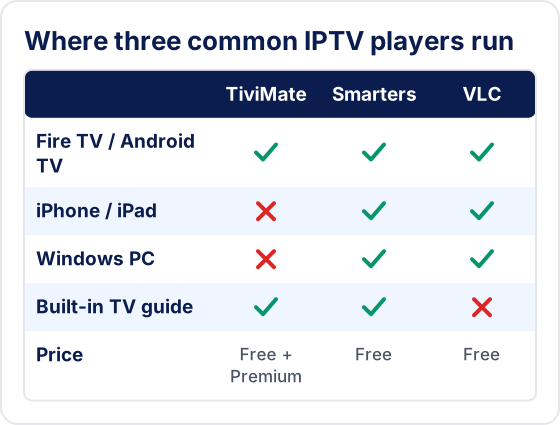
- Firestick or Fire TV. TiviMate or IPTV Smarters Pro, both sideloaded. Our Firestick IPTV setup guide covers the Downloader steps.
- Android TV or Google TV box. TiviMate from Google Play is the usual first pick for live TV.
- iPhone or iPad. There is no TiviMate for Apple devices, so look at IPTV Smarters, GSE Smart IPTV or VLC.
- Windows or Mac. VLC plays an M3U link with no setup; there is no native TiviMate for desktop.
How do you choose the right IPTV player for your setup?
Answer four questions in order and most of the list rules itself out. The player only changes how your channels look and behave; it never adds channels of its own.
- Which device? Cross off every app that has no version for it. This alone removes TiviMate for iPhone, Roku and smart-TV owners.
- Live TV or on-demand? If you mostly flick between live channels, a grid TV guide matters most. If you mostly watch movies and series, an app with separate VOD and Series sections is easier to browse.
- One app or several? A household with a Firestick, an iPhone and a laptop may prefer one app everywhere, so the menus feel the same on every screen.
- What login did your provider give you? Xtream Codes details (server, username, password) work in TiviMate, IPTV Smarters and IBO Player. A plain M3U link is what VLC and Perfect Player expect. See how Xtream Codes and M3U logins differ.
Should you install more than one IPTV app?
Yes, a second free player is the quickest way to find out what is wrong when something breaks. If a channel fails in both apps, the problem is the stream or your connection. If it plays in one app but not the other, the problem is a setting in the app that fails, such as the player or stream format.
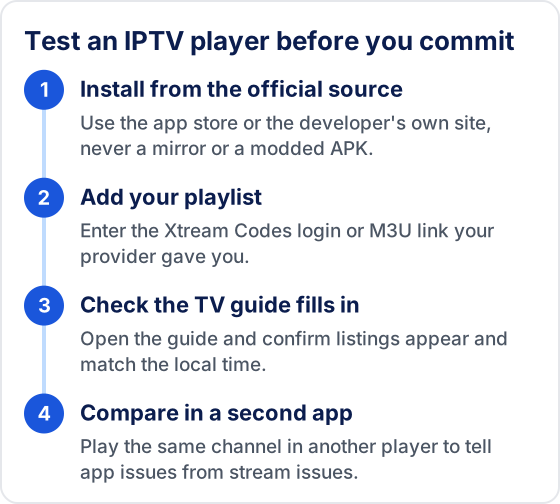
Keep the backup signed in with the same login, but check how many simultaneous connections your plan allows before you watch on two devices at once.
What mistakes do people make when picking an IPTV app?
Most bad experiences come from where the app was downloaded or from blaming the player for problems it cannot fix.
- Installing a modified APK. "Unlocked" or "Pro" builds from mirror sites can carry malware. Use the app store or the developer's own site.
- Expecting channels in the app. Every player here is empty until you add a playlist from a provider.
- Paying for a premium tier first. Load your playlist in the free version and check the guide and playback before you upgrade.
- Blaming the app for buffering. Stream quality comes from the provider and your network. Our IPTV buffering fixes help you find the cause.
- Using a phone app on a TV. Apps designed for touch screens can be slow to move around with a remote.
Frequently Asked Questions
What is the best IPTV app in 2026?
TiviMate is the most widely recommended IPTV player app for Firestick, Android TV and Google TV devices, for its cable-style EPG, catch-up TV, 4K support and multi-playlist management (some of these need TiviMate Premium). On iPhone, iPad or PC, IPTV Smarters Pro, GSE Smart IPTV or VLC are the usual choices.
Does TiviMate work with Tivimate IPTV?
Yes. After subscribing to Tivimate IPTV, enter your Server URL, Username, and Password via Xtream Codes API in TiviMate, and your channels and EPG load into the app.
Is IPTV Smarters Pro free?
Yes. IPTV Smarters Pro is free to download on Android, iOS and Windows. It works with Tivimate IPTV via Xtream Codes API and supports EPG, VOD and catch-up where your provider offers them.
What IPTV app works on Firestick?
TiviMate and IPTV Smarters Pro are the most common IPTV apps on Firestick. Both work with Tivimate IPTV and are usually installed with the Downloader app. Full setup steps are on the Tivimate Firestick page.
Can I use Kodi for Tivimate IPTV?
Yes. Kodi works with Tivimate IPTV using the PVR IPTV Simple Client add-on and your M3U URL. TiviMate or IPTV Smarters Pro are generally easier to set up.
Ready to Try These Apps?
All apps above work with Tivimate. Start your free 24-hour trial and set up on your preferred device in minutes.
Try Tivimate IPTV
55,000+ live channels · 180,000+ movies and series · 4K on selected channels · No contract · From $19.99/month