
Samsung Smart TVs don't come with a built-in IPTV player, but they run Tizen OS and can install one from the Samsung Apps store. The player is only the app: you add your own subscription with the details from your welcome message. This guide covers the store apps and the simplest fallback if your model doesn't list one. If you want the bigger picture first, see our full guide to One IPTV.
What You Need Before You Start
- ✓A Samsung Smart TV running Tizen OS. Models from 2017 onward have the widest app choice. Update the TV software first (Settings → Support → Software Update).
- ✓Your subscription details: the Xtream Codes server URL, username and password, plus the M3U playlist link, from your welcome message. Our Xtream Codes and M3U comparison explains which app uses which.
- ✓Home broadband — 10 Mbps+ for HD, 25 Mbps+ for 4K, more if several screens stream at once. The FCC's broadband speed guide has typical figures by activity.
- ✓A phone or computer, if you use a player that loads playlists through its website.
Which IPTV Players Work on Samsung TVs?
IPTV players that have been listed in the Samsung Apps store include IPTV Smarters Pro (Xtream Codes login) and SS IPTV (M3U playlist link). There are also MAC-based players such as Flix IPTV, which show a device address on screen and load your playlist from the developer's website after a paid activation. Samsung's store differs by country and model year, and apps are added and removed over time, so search the store rather than relying on any fixed list.
TiviMate — a third-party player developed by Armobsoft FZE, not our product — is Android-only and can't be installed on a Samsung TV. To use it, add a Firestick or Google TV device (Method 3).
Which Method Should You Pick for Your Samsung TV?
Pick by the details you have and what your TV's store lists. If you have an Xtream Codes login and IPTV Smarters Pro appears in Apps, use Method 1. If you only have an M3U link, or Smarters isn't listed, use SS IPTV or a MAC-based player (Method 2). If neither shows up on your model, or you specifically want TiviMate, a streaming stick (Method 3) is the dependable route.
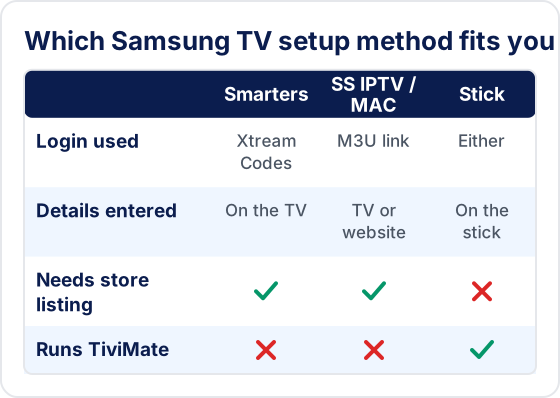
A stick is also worth considering if you plan to keep the TV for years. Store apps on the TV depend on Samsung continuing to list them for your model year, while a stick can be replaced or moved to another TV.
Method 1: IPTV Smarters Pro from the Samsung Apps Store
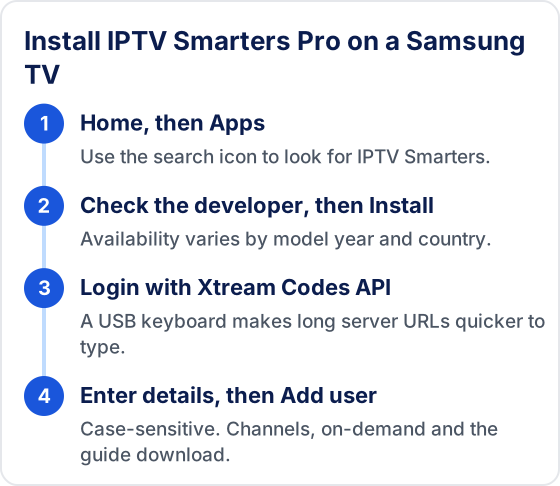
- 1Press the Home button on your Samsung remote and open Apps.
- 2Select the search (magnifying glass) icon and search for "IPTV Smarters".
- 3Open the listing, check the developer, and select Install. Then open the app.
- 4Choose Login with Xtream Codes API.
- 5Enter any profile name, then the username, password and server URL from your welcome message. They are case-sensitive.
- 6Select Add user. The app downloads live channels, on-demand content and the TV guide.
💡 A USB keyboard plugged into the TV makes typing long server URLs much quicker than the on-screen keyboard.
Method 2: M3U or MAC-Based Players (SS IPTV, Flix IPTV)
- 1Install the player from the Samsung Apps store and open it.
- 2For SS IPTV: open Settings → Content → External playlists → Add, enter a name and your M3U link, and select Save.
- 3For MAC-based players: note the MAC address (and device key, if shown) on screen.
- 4On a phone or computer, open the player developer's official website, enter the MAC address, and paste your M3U link.
- 5Restart the app on the TV. Your channel list loads.
Only enter your playlist on the player developer's own website, and remember that a player's activation fee is separate from your Tivimate IPTV subscription plan.
Method 3: Add a Streaming Stick
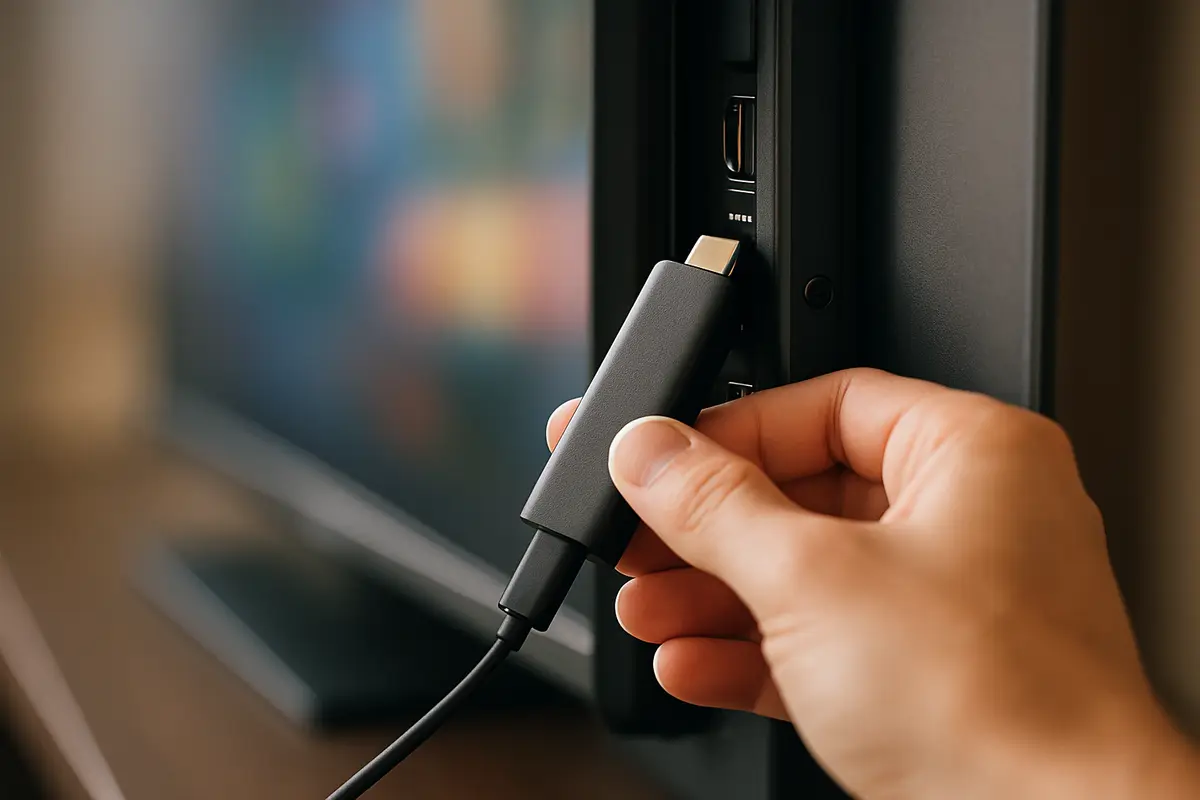
If your TV doesn't list a suitable player — common on pre-2017 models — plug an Amazon Firestick or Google TV device into a spare HDMI port. You get the full range of Android players, including TiviMate. Follow the Firestick guide or the Android TV guide. This is also the simplest route if you need a player the Samsung store doesn't carry.
How Do You Find Your Samsung TV's Model Year?
Look up the model code. It is printed on the label on the back of the TV, and on most recent models it is also shown under Settings → Support → About This TV. Enter that code on Samsung's support website to see the model year and the latest software for it. Knowing the year tells you quickly whether you are likely to find a player in the store (2017 onward has the widest choice) or should go straight to a streaming stick.
Troubleshooting Samsung TV IPTV
❓ App not in the Samsung store
Search for the other players above, check for a TV software update, or use Method 3. Avoid unofficial install files: they can't be verified and may stop working after a TV update.
❓ Login or authorization errors
Re-enter the details carefully (they are case-sensitive), check http:// and any port in the server URL, and make sure you are not over your device limit. See IPTV Smarters failed to authorize.
❓ Channels not loading
Open the M3U link in a browser to confirm it works, then reload the playlist in the app. More causes: IPTV not loading channels.
❓ TV guide empty
Reload the EPG in the player's settings and allow a few minutes. See EPG not working.
❓ Buffering on 4K channels
4K needs the most bandwidth. Use Ethernet or 5 GHz Wi-Fi and see how to fix IPTV buffering.
Performance Tips for Samsung TVs
- ▸Use the Ethernet port. A wired connection is the most reliable option for live sport. On Wi-Fi, choose your router's 5 GHz network.
- ▸Cold-restart the TV. Press and hold the power button on the remote until the Samsung logo appears. Turning the TV off normally only puts it in standby.
- ▸Clear the app cache. On recent models: Settings → Support → Device Care → Manage Storage, select the player, then clear its cache. On older models, delete and reinstall the app.
- ▸VPNs go on the router. Samsung TVs generally can't run VPN apps. A router VPN may help if your ISP slows streaming traffic, but it adds latency and some services block VPN addresses. See when a VPN helps or hurts IPTV.

Frequently Asked Questions
Does Tivimate IPTV work on Samsung Smart TV?
Yes, through a player app. Samsung TVs run Tizen OS and can install an IPTV player from the Samsung Apps store, such as IPTV Smarters Pro (Xtream Codes login) or SS IPTV (M3U playlist link), where your model and country list them. You then add your subscription details from your welcome message.
Which IPTV apps are available on Samsung TVs?
Players that have been listed in the Samsung Apps store include IPTV Smarters Pro, SS IPTV and MAC-based players such as Flix IPTV. The store differs by country and model year, and apps are added and removed over time, so search the store on your own TV.
Can I install TiviMate on a Samsung TV?
No. TiviMate is a third-party player developed by Armobsoft FZE, not our product, and it is Android-only. To use it, plug a Firestick or Google TV device into a spare HDMI port.
What if my Samsung TV is older or doesn't list a player?
Models from 2017 onward have the widest app choice. If your TV doesn't list a suitable player — common on pre-2017 models — add an Amazon Firestick or Google TV device, which runs the full range of Android players.
Does Samsung Smart TV have a built-in IPTV app?
No. Samsung does not pre-install an IPTV player; you install one from the Samsung Apps store, or use a streaming stick.
Need Help with Your Samsung TV?
Our team will walk you through setup on your specific Samsung model via WhatsApp — for free.
New to IPTV? Read our Tivimate IPTV, explained — covering how IPTV works, every device setup, troubleshooting, pricing, and how to choose the best IPTV service provider.
Try Tivimate IPTV
55,000+ live channels · 180,000+ movies and series · 4K on selected channels · No contract · From $19.99/month