
A TiviMate login can mean two things. The TiviMate account is an email and password held by the app's developer, Armobsoft FZE, at tivimate.com, and it relates to Premium, an upgrade that adds app features only. Your IPTV login is the M3U link, Xtream Codes details or portal address from your provider, and it goes into the app's Add Playlist screen. Channels come only from the second. A failed login goes to whoever issued it: the developer for the first, your provider for the second.

A word on who is writing. This site sells an IPTV service, Tivimate IPTV. We are not the developer of the TiviMate app, despite the similar name, and we cannot see or reset TiviMate accounts. If you bought a subscription from us, the section on your subscription login is the one you want.
Which TiviMate Login Do You Need?
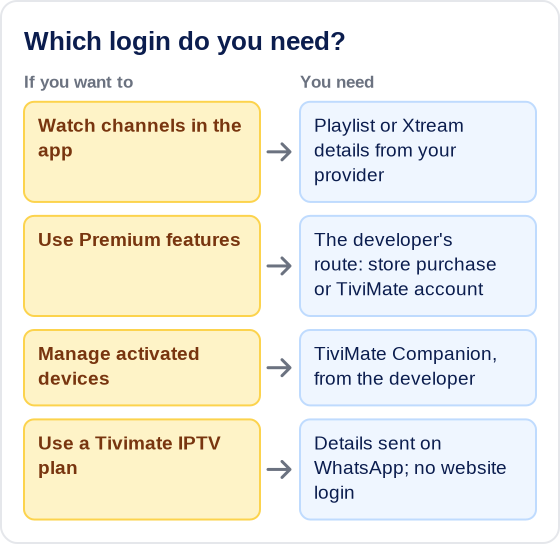
Start from what you are trying to do, because that tells you whose login it is and who can help when it fails.
The TiviMate App Account
This belongs to the developer. tivimate.com has Log in and Sign up links in its header. The log-in page asks for an email address and a password and offers Forgot password?, and the sign-up page asks for an email address and a password twice. We opened both pages on 4 November 2026 and did not create an account.
What the account is for needs care, because the public pages say little. The facts we could read are these:
- The Google Play listing says any paid subscription or premium upgrade “unlocks application features only” and includes no channels, streams or media.
- The terms of use describe a one-time lifetime purchase and auto-renewing subscriptions. Store purchases are managed in your account with that store, and the terms also mention purchases made directly on the developer’s website.
- The TiviMate Companion listing says that app unlocks Premium on devices without Google Play and manages your activated devices. Our TiviMate Companion guide covers it.
What we could not read: anything behind the log-in, whether a free user needs an account at all, and how a Google Play purchase and a tivimate.com account relate. The public pages do not say, and the app’s own sign-in screens were not part of this check. For what the upgrade adds, see our TiviMate Premium guide. For account trouble, the developer lists support@tivimate.com.
Your Subscription Login: Playlist or Xtream Details
TiviMate is a player, so it needs a source. The listing says it supports M3U, Xtream Codes and Stalker Portal, and “to watch anything, you must add your own playlists”. Those details come from whoever sells you the IPTV service, and the developer has no record of them. Each format asks for something different:
| Format | What you enter |
|---|---|
| Xtream Codes | Server URL, username, password |
| M3U | One playlist link, which often contains the username and password |
| Stalker Portal | A portal address, with the device’s MAC address registered by the provider |
Our page on Xtream Codes and M3U explains the difference. If you subscribe to Tivimate IPTV, your login details are sent on WhatsApp after payment and there is no customer dashboard or website to sign in to. The credentials are the account. They work in players that accept Xtream Codes, not only in TiviMate.
How to Enter Your IPTV Login in TiviMate
The app is built for Android TV devices and remote control, and the developer says it is not optimized for phones or tablets. Install it first if you have not: our guide to installing TiviMate has the steps by device. Then:
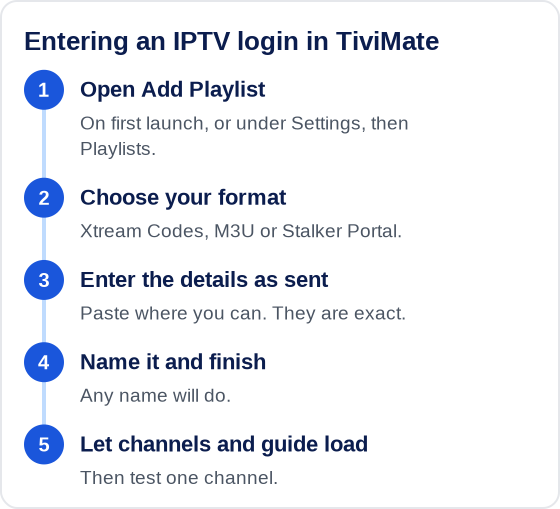
Screens change between versions, so go by the labels and not their position. Our add a playlist to TiviMate guide goes through it in more detail, and the installation guide covers other players. If you need a playlist guide address as well, read our TiviMate EPG page.
TiviMate Login Not Working?
First work out which form refused you. Then the fix is short.
On tivimate.com or a Sign-In Prompt
Check that you are using the email you signed up with, then use Forgot password?. A provider’s username will not work here. If Premium was bought through Google Play, check that the device uses the same Google account. Anything further goes to the developer, because no IPTV provider can see this account.
On the Add Playlist Screen
- Copy, do not retype. Details are easy to mistype with a remote. Watch for 0 and O, and for a space copied at the end.
- Check the server URL. Include the http:// or https:// and the port, exactly as the provider sent it.
- Check the plan is still active. An expired plan can look like a wrong password.
- Check how many devices are streaming. Your plan limits connections, and Tivimate IPTV plans cover 1 to 4. See how many devices can stream at once.
- Test the same login in a second player. If it fails there too, the problem is the account or the network, not TiviMate.
If the login is accepted and something else is wrong, use TiviMate not working, or look up the number on TiviMate error codes. Smarters users have a page for its authorization errors.
Keeping Both Logins Safe
Anyone holding your IPTV details can use your connections. Do not post them, or an M3U link, in reviews, forums or screenshots. Enter them only in apps from an official store or the developer’s site, and be careful with messages that ask you to pay again or confirm card details. If you think your details have leaked, ask your provider for new ones.
Avoid “free Premium account” offers. The developer’s terms grant a personal, non-transferable license, and a shared account or modified app is outside them. We do not link to any. If you only want to see whether a service suits you, Tivimate IPTV has a 24-hour free trial with no card details, and the free version of TiviMate is enough to test a playlist.
Frequently Asked Questions
Do I need a TiviMate account to watch channels?
An account does not bring channels. The developer states that any paid subscription or upgrade unlocks application features only, so whatever you watch comes from a playlist you add. That playlist's login comes from your IPTV provider.
Is my IPTV username the same as my TiviMate account?
No. The tivimate.com form asks for an email address and password. A provider's Xtream login is a server URL, a username and a password, and it goes into the Add Playlist screen. Putting one into the other's form will fail.
I forgot my TiviMate password. What do I do?
If it is the developer's account, use Forgot password? on the tivimate.com log-in page, or email support@tivimate.com. If it is your playlist password, ask your IPTV provider. Tivimate IPTV subscribers can ask us on WhatsApp.
Can you reset my TiviMate account or restore my Premium?
No. We are not the developer and cannot see or change TiviMate accounts or purchases. We can only help with the Tivimate IPTV subscription we sell.
Is there a free TiviMate Premium account or login I can use?
Not one we would point you to. The developer's terms grant a personal, non-transferable license, so a shared login or a cracked app is outside them, and it means handing your device to whoever passed it round. The free version of the app is on Google Play.
Is there a Tivimate IPTV login page on this website?
No. This site has no customer dashboard. Our subscribers enter their details in a player app, so treat any page that asks you to sign in to Tivimate IPTV on the web with suspicion.
Need a playlist for TiviMate?