
For TiviMate on the onn 4K Pro, open Google Play on the box, search for TiviMate IPTV Player by Armobsoft FZE and install it; the box runs Google TV, so you should need no Downloader code. Open TiviMate, choose Add playlist and enter your provider's details. Two versions exist: reviews from 2024 and 2026 both list 3GB of RAM, 32GB of storage and a 100 Mbps Ethernet port. TiviMate brings no channels, so you still need an IPTV subscription.
We sell an IPTV subscription, Tivimate IPTV, and no hardware. The TiviMate app comes from Armobsoft FZE, and this site is not its developer. Walmart does not pay us. The hardware facts below come from hands-on reviews by others, as we read them on 4 November 2026. We did not buy or measure this box, and Walmart’s own listing did not open for us, so we could not check them against the maker.
Which onn 4K Pro Do You Have?
Two boxes share the name. Lon.TV’s May 2026 review covers an update to the model released two years earlier, and says owners of the older one may find little reason to switch. The 2024 column uses AFTVnews’s launch report and Lon.TV’s 2024 review.
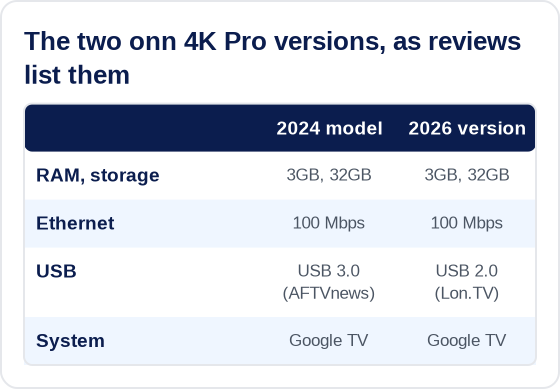
| What the reviews list | 2024 model | 2026 version |
|---|---|---|
| System | Google TV | Google TV on 32-bit Android 14 |
| RAM and storage | 3GB and 32GB, about 20GB free after updates | 3GB and 32GB |
| Ethernet | Built in, 10/100 Mbps | Built in, 100 Mbps |
| Wi-Fi | Wi-Fi 6 | About 500 Mbps in Lon.TV’s test |
| USB | Full-size USB 3.0, per AFTVnews | USB 2.0, per Lon.TV |
| Price at the time | $49.88 | $60 |
We could not find a maker’s page that lists these, or a sure way to tell the versions apart by the label, so check the date on your receipt or the listing where you buy it. Prices change, so treat those two as history. Lon.TV found the 2026 processor roughly three times faster than the earlier model. It also says 32-bit Android stops some demanding apps, naming high-end emulators. We found no report of that affecting TiviMate, and we have not checked.
How to Install TiviMate on the onn 4K Pro
The box runs Google TV, and TiviMate’s Google Play listing describes an app designed for Android TV. Google says all apps built for Android TV work on Google TV, so you should not need Downloader or a sideload. Menu names below are common usage, and we have not confirmed each one on this box.
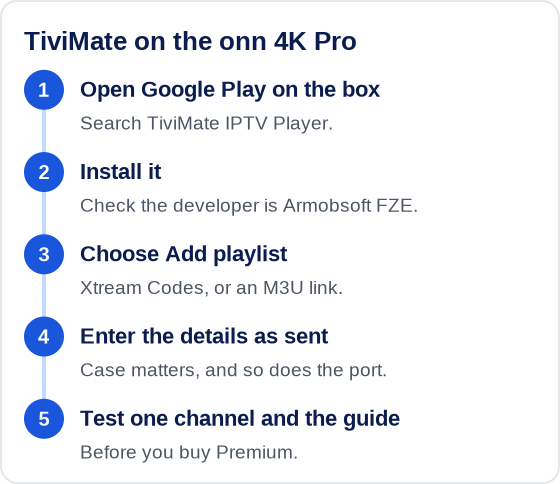
The listing’s developer is Armobsoft FZE. A copy from any other site, including one advertised as unlocked or with Premium, is not the developer’s app, so skip it. It would be holding your login. Our guide to adding a playlist to TiviMate goes through each field, and our page on Xtream Codes and M3U explains the two logins.
Buying TiviMate Premium on the onn 4K Pro
Premium is an in-app purchase through Google Play on this box. You should not need the TiviMate Companion app, which exists for devices without Google Play. The listing names recording and multiview, and our TiviMate Premium guide explains what it unlocks and why we do not quote a price: the developer does not publish one on its website.
Should You Use Ethernet or Wi-Fi?
Test both, because the usual advice does not simply hold here. Both versions have an Ethernet port that stops at 100 Mbps. Lon.TV reached about 500 Mbps over Wi-Fi on the 2026 version, and in 2024 found Wi-Fi did not fare much better than Ethernet. A cable still removes Wi-Fi interference from the question, so compare the two at the hour you watch.
Lon.TV’s 2024 follow-up also tried a USB gigabit adapter and reached about 400 Mbps, with some adapters working and some 2.5-gigabit ones not. Nothing we read suggests IPTV needs that, so we would not buy one for this.
Using a USB Drive
Lon.TV connected an exFAT NVMe drive to the 2024 model and played files from it in VLC. That shows the port can see a drive. It does not show TiviMate can record to one, and we could not confirm that on either version. Test a short recording first. Internal space is limited too: AFTVnews reported about 20GB free on the 2024 model, and as arithmetic, not a measurement, a 5 Mbit/s stream uses about 2.25 GB per hour (5 x 0.45). Our guide on how to record IPTV covers the rest, including the storage arithmetic.
How Does It Differ From Other Boxes?
- The onn 4K Plus. The review we read listed 2GB of RAM and 16GB of storage, with no Ethernet port and one USB-C port. See TiviMate on the onn 4K Plus.
- A Firestick. It has no Google Play, and models on Vega OS cannot install TiviMate at all. See IPTV on a Firestick.
- Other boxes. Our IPTV box guide covers what each system can run. We do not rank the onn 4K Pro against them, because we hold no test of any of them.
Fixing Problems on the onn 4K Pro
| What you see | Check first |
|---|---|
| TiviMate is not in Google Play | Search the exact name and check the developer. Update the box, and restart it. |
| Login refused | The http:// or https:// and port in the server URL, then failed to authorize, which applies to most players. |
| TiviMate misbehaves | See TiviMate not working. |
| Guide empty | See the TiviMate EPG guide. |
| Video stalls | Try the other connection, cable or Wi-Fi, then the IPTV buffering guide. |
Frame rate is the other thing to watch. Lon.TV found the 2026 version matched frame rate in some apps and not others, which can cause motion jitter. That test was not in TiviMate. If motion looks wrong on live channels, the TiviMate settings guide covers where to look.
Where Does the Playlist Come From?
From an IPTV provider, since neither the box nor the app supplies one. Tivimate IPTV, which we sell, gives an Xtream Codes login on WhatsApp and a 24-hour free trial with no card details. We have not checked it on this box, so use the trial to do that. Our guide to IPTV providers discloses which services belong to us.
Frequently Asked Questions
Do I need to sideload TiviMate on the onn 4K Pro?
You should not need to. The box runs Google TV, which comes with Google Play, and TiviMate is listed there as TiviMate IPTV Player by Armobsoft FZE. We have not confirmed the listing on your specific box, so search for it first and do not install a copy from elsewhere.
Is the onn 4K Pro Android TV or Google TV?
Reviewers describe it as a Google TV device, and Lon.TV says the 2026 version runs a 32-bit Android 14 underneath. Google says all apps built for Android TV work on devices running Google TV, so the difference does not change the install.
Do I need TiviMate Companion on the onn 4K Pro?
No, as far as we can tell. Companion is for devices without Google Play, such as a Firestick. On this box you buy Premium inside TiviMate through Google Play.
Can TiviMate record to a USB drive on the onn 4K Pro?
Recording needs TiviMate Premium and somewhere to store the files. Lon.TV found a USB drive was detected on the 2024 model, but that test used VLC, not TiviMate. We could not confirm recording to USB on either version, so try it with a short recording before you rely on it.
Does Tivimate IPTV come with the onn 4K Pro?
No. The box comes with neither the TiviMate app's Premium upgrade nor any IPTV subscription. Tivimate IPTV is the service sold on this site, and we are not connected with Walmart or the app's developer.
Need a playlist for TiviMate?