
Indian IPTV is a subscription that streams Indian-language live TV over the internet to a player app on your TV, stick or phone, with no dish or cable box. In the USA you can sign up for an Indian-only service, add an Indian pack to a US live TV service, or use a general IPTV plan that carries Indian channels next to US ones. Lineups change, so check the Hindi, Tamil, Telugu and Punjabi channels you watch during a free trial before you pay.

This guide is for households in the US that want TV from home in their own language: a parent who watches Hindi serials every night, a family that follows Tamil or Telugu news, or someone who only wants the cricket. It covers what to check by language, what to ask about cricket, which devices work, what it costs and how setup goes. A word on who wrote it: this site sells an IPTV plan, Tivimate IPTV. So we name no channel we cannot back, and we ask you to check everything in the trial before you buy.
What Is Indian IPTV and How Does It Work in the USA?
Indian IPTV means Indian channels delivered as internet streams instead of through a satellite dish or a cable line. You need three things: a subscription, a player app on a device you already own, and a steady home connection. The subscription gives you a login; the app turns that login into a channel list with a TV guide.
In the US, people usually get Indian TV in one of three ways:
- An Indian-only service. A company that sells only South Asian channels, such as YuppTV, usually in its own app.
- An add-on pack on a US live TV service. Sling TV, for example, sells Indian-language packs on top of its own service.
- A general IPTV plan. One subscription that carries channels from several countries, played in an app such as TiviMate. Tivimate IPTV sells this kind of plan; which Indian channels it carries is something to check in the trial.
The first two are easy to price and easy to cancel, but each language or pack is often a separate purchase. A general plan puts everything in one login, so the question becomes whether it carries your channels in your language. That is what the next section is about. For how global lineups work in general, see what a worldwide channel count really tells you.
Which Indian Channels Can You Watch, by Language?
It depends on the provider’s lineup on the day you subscribe, so check each language in the trial rather than trusting a list. We do not publish an Indian channel list on this page. Lineups change from month to month, and a list on a sales page shows what a seller claims, not what plays on your TV tonight.
What you can do is check, language by language, the kinds of channels your household watches:
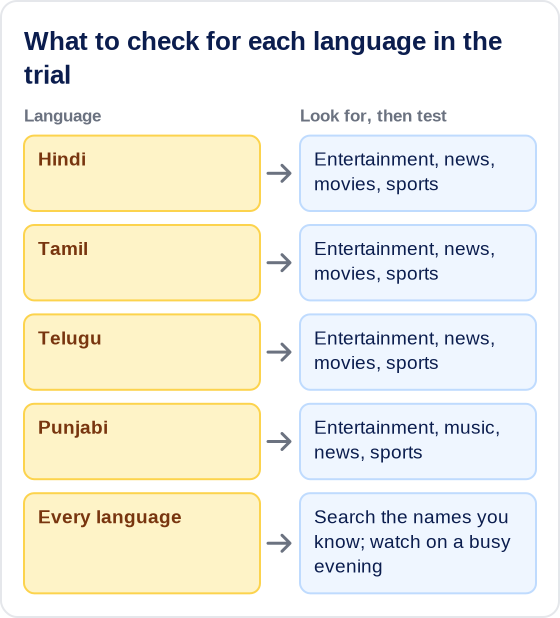
- Hindi. Look for the general entertainment channels that carry the evening serials, at least one news channel, a movie channel and any sports channel you follow.
- Tamil and Telugu. South Indian channels are often grouped by language. Check entertainment, news and movies in each, not just one of the two.
- Punjabi. Look for entertainment, music and news channels, and any devotional programming your family watches.
- Other languages. Malayalam, Bengali, Marathi, Gujarati and Kannada viewers should search for their own language group, too.
During the trial, open the channel groups, search for the channel names you know and watch each one for a few minutes. Do it again in the evening, when most of your family watches. Our guide on how to test IPTV before buying lists the other checks to run in the same 24 hours.
Can You Watch Cricket and the IPL on Indian IPTV?
Only if the provider’s lineup carries the channel that shows the match, and that changes by country and by season. Cricket rights are sold separately for each tournament and each country. The channel that shows a match in India is often not the one that shows it in the US.
On our side, sports channels are in every plan, with no separate sports tier. We do not promise any cricket match, series or the IPL, because we do not register which sports rights our lineup carries. So check it the same way as your languages: during the trial, search for the sports channels you know and look at the TV guide for the next match. If the match you care about is not listed, do not buy for it.
Time zones matter too. A match that starts in the Indian afternoon is early morning on the East Coast and the middle of the night in California. Before you count on a replay, ask support whether catch-up covers the channel you want.
Which Devices Work With Indian IPTV?
Almost any streaming device you already own. Tivimate IPTV works on Firestick, Android TV, Apple TV, Smart TVs, iPhone, Windows and MAG boxes. Roku is not supported. You install a player app on the device and log in. Many families use the TiviMate player on a Firestick or an Android TV box, but any app that takes an Xtream Codes login or an M3U link will do.
Plans come with 1 to 4 simultaneous devices, depending on the tier you choose. That matters in a family: if grandparents watch Hindi serials in one room while the kids watch something else in another, you need two connections, not one. Our page on how many devices can use IPTV at once explains connection limits.
For a first setup on a Fire TV stick, the IPTV on Firestick guide walks through it step by step. Tivimate IPTV is an independent service and is not the developer of the TiviMate app, which is made by Armobsoft FZE according to its Google Play listing.
How Much Does Indian IPTV Cost Compared With Sling and YuppTV?
Our plans cost $19.99 for one month, $29.99 for three months, $39.99 for six months and $69.99 for 12 months + 2 free, all in US dollars, with the same channels in each. We could not print a current Sling TV or YuppTV price, for the reason below.
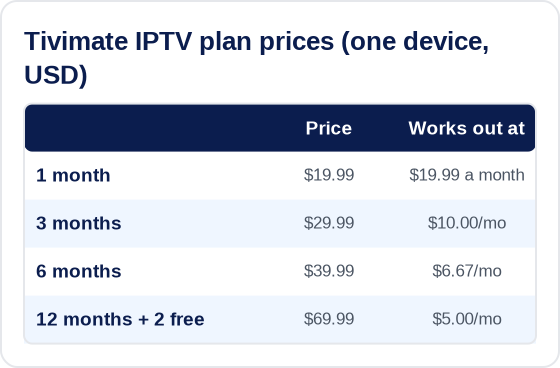
| Plan | Price | Works out at |
|---|---|---|
| 1 month | $19.99 | $19.99 a month |
| 3 months | $29.99 | $10.00/mo |
| 6 months | $39.99 | $6.67/mo |
| 12 months + 2 free (14 months) | $69.99 | $5.00/mo |
Prices are for one device. More screens are discounted: 2 devices -20%, 3 devices -25%, 4 devices -30%. Plans are prepaid with no contract, and they do not renew automatically. You pay by Visa, Mastercard, Google Pay or Apple Pay. The full table is on the Tivimate IPTV plans and prices page.
Sling TV and YuppTV. Both sell Indian-language TV in the US and publish their prices on their own sites. On November 24, 2026 we tried to read those prices from the official pages: Sling’s Desi TV page refused our request, and YuppTV’s site showed no prices without its app. Other websites quote figures that disagree with each other, so we print none. Before you compare, check these on each site:
- the monthly price for each language pack you need, not just the first one;
- whether that is an introductory price and what it becomes later;
- whether the base service must be bought first;
- whether the plan renews automatically;
- how many screens can watch at the same time.
Then hold those answers against a single plan that covers every language in one login. Our guide to what IPTV costs explains the usual price ranges.
How Do You Set Up Indian IPTV?
It takes five steps, and you can do all of them during the free trial before you pay anything.
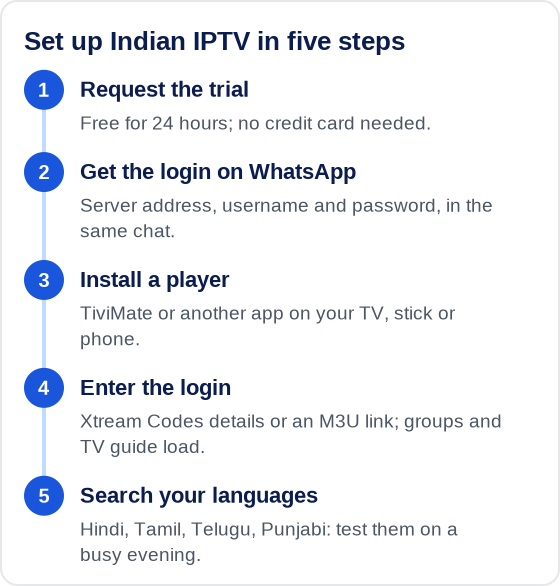
- Request the trial. Start the free 24-hour IPTV trial; no credit card is needed.
- Get your login. The trial login comes back in the same WhatsApp chat: a server address, a username and a password.
- Install a player. Put a player app on your TV or stick. TiviMate, IPTV Smarters and others work.
- Enter the login. Type the Xtream Codes details into the player, or paste the M3U link. The channel groups and TV guide load.
- Check your languages. Search for the Hindi, Tamil, Telugu or Punjabi channels you watch and test them on a busy evening.
If something does not load, our IPTV installation guide covers each device in detail. When you are happy, choose a plan; after payment, your login details are sent on WhatsApp.
Is Indian IPTV Legal in the USA?
IPTV as a technology is legal in the US; what matters is whether the seller holds the rights to the channels it streams. That applies to Indian channels like any others. Many IPTV sellers do not say what rights they hold.
We do not publish the agreements behind our lineup, so we will not tell you our channels are licensed. Ask any seller, including us, what it can show you, and read our guide on whether IPTV is legal for the US position in plain terms.
Frequently Asked Questions
What is the best IPTV for Indian channels in the USA?
The one that carries your channels, in your language, and plays them smoothly on your TV in the evening. No ranking can tell you that. Use a trial to check your own channel list, and compare the total price for every language you need.
Can I watch Hindi channels on IPTV?
Yes, if the provider's lineup carries them. Search for the Hindi channels you watch during the trial, and check entertainment, news and movies, not only one channel.
Does Indian IPTV work on a Firestick?
Yes. Install a player app such as TiviMate on the Firestick, then enter your login. Tivimate IPTV also works on Android TV, Apple TV, Smart TVs, iPhone, Windows and MAG boxes; Roku is not supported.
Is there a free trial for Indian IPTV?
Tivimate IPTV has a free 24-hour trial with no card needed. You request it on WhatsApp, and you can use the 24 hours to check every language you watch.
Do I need a VPN for Indian IPTV in the US?
No. A US subscription plays on a US home connection, and we give no advice on using a VPN to get around a broadcaster's location limits.
Where These Facts Come From
Our prices, trial, devices and payment terms are the terms we publish on our own plans page. The Sling TV and YuppTV price pages were read, unsuccessfully, on November 24, 2026. The TiviMate developer’s name comes from its Google Play listing. To see the service itself, start at the Tivimate IPTV home page. More guides like this one are in the IPTV guides hub.
Looking for an IPTV subscription?