
TiviMate IPTV Player: What It Is and How to Use It
What the app does and does not do, what the paid upgrade adds, how to install it on your device, and where to go when it stops working.
TiviMate IPTV Player is an Android TV app published by Armobsoft FZE. It plays a playlist you add from an IPTV provider and shows it in a TV guide grid; it includes no channels. The app is free to install, and TiviMate Premium is a paid upgrade that adds features such as more than one playlist, catch-up, recording and multiview. This site is not its developer and is not affiliated with Armobsoft FZE. We sell a separate IPTV subscription, Tivimate IPTV.
We did not make this app. TiviMate comes from Armobsoft FZE. We sell a subscription called Tivimate IPTV, and the similar name is the most common confusion on this site. We have not run tests on the app, so nothing here is a benchmark. App facts come from the developer’s Google Play listing, read in November 2026, and we say where we rely on anything else.
Basics
What Is TiviMate?
TiviMate is a player. The developer calls it “a media player only” and says it “does not provide any content”. It is built for a TV and a remote: the listing says it is designed for Android TV and remote control navigation and is not optimized for touch devices such as phones or tablets. Google Play showed more than 5 million downloads and a last update of June 22, 2026 when we read it.
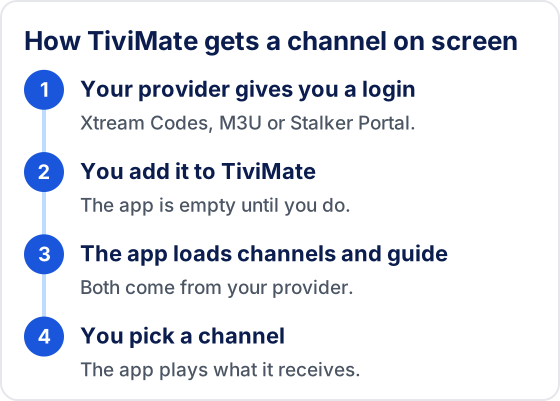
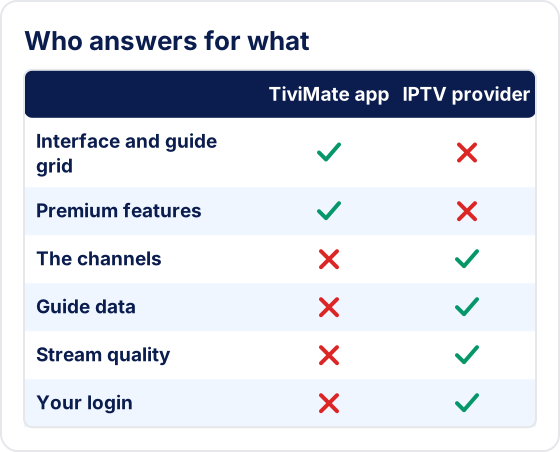
The app does nothing until you add a playlist. That is why TiviMate has no channel list of its own: the list you see is whatever your provider sends. The same goes for the guide and the picture quality. For our opinion of it, with its limits, see the TiviMate review.
How it works
How the TiviMate App Works
The app reads three playlist formats, according to its listing: M3U, Xtream Codes and Stalker Portal. Your provider chooses which one to give you. An Xtream Codes login is a server address, a username and a password. An M3U playlist is a link or a file listing the channels, and it often needs a separate guide link as well. A Stalker Portal login uses a portal address.
So there are two products in play, from two different companies. The next diagram shows which one answers for what. When something goes wrong, it tells you who can fix it.
Install
How to Install TiviMate
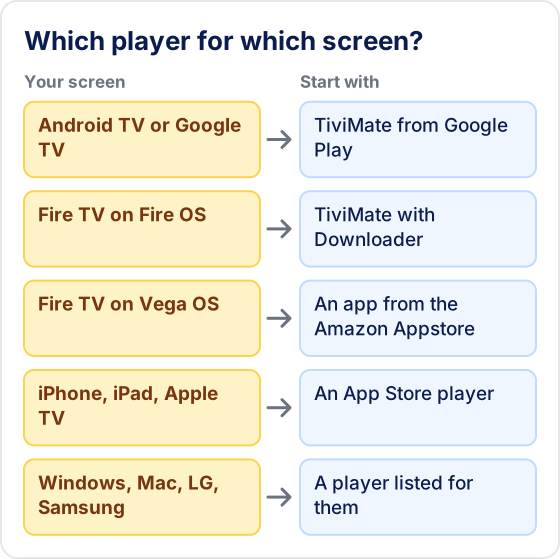
The route depends on your device. Our TiviMate install guide has the whole list, and each row here links to the steps.
| Device | How the app gets there |
|---|---|
| Android TV and Google TV | Google Play |
| NVIDIA Shield TV | Google Play |
| Chromecast with Google TV | Google Play |
| Fire TV on Fire OS | Downloader, code 272483 |
| Fire TV on Vega OS | Cannot install it |
| Android phone or tablet | Installs, but not built for touch |
| Windows PC | Android emulator only |
| iPhone, iPad, Apple TV, Roku | No version we could find |
Get the app from the Play listing or the developer’s own file. Copies sold or shared as unlocked Premium are not the developer’s, you cannot tell what they contain, and we do not link to them.
Setup
How to Use TiviMate: First Setup
Menu wording can differ between versions, and the names here are the ones in common use. Our TiviMate playlist guide covers each field.
- Open TiviMate and choose Add playlist.
- Pick the format your provider gave you: Xtream Codes, M3U or Stalker Portal.
- Enter the details exactly as sent. Passwords are often case-sensitive, so copy them with care.
- Wait for the channels and guide to load. A large playlist takes longer.
- Pick a channel from the guide and check that it plays.
After that, a few TiviMate settings are worth a look. Leave the others alone until something bothers you.
Guide
The TiviMate TV Guide
The guide grid is the feature the developer leads with: “browse the full program schedule in a fast, clear grid”. It only shows what your provider’s guide data contains, so gaps and wrong listings usually start there and not in the app. An Xtream Codes login usually brings the guide along. An M3U playlist may need a separate link. Our TiviMate EPG guide shows where that link goes, and what an IPTV EPG is covers the basics.
Features
What the Developer Lists
This is the listing’s own feature list, in plain words. We have not measured any of it.
- Interface for large screens, described as customizable.
- Multiple playlists you can switch between.
- Favorite channels and search across channels and shows.
- Catch-up, which also needs a provider that keeps past broadcasts.
- Recording; see recording IPTV.
- Parental controls to manage access.
- Multiview, several channels on one screen; see TiviMate multiview.
To move a setup to another device, see TiviMate backup and restore.
Other players
TiviMate and Other Players
TiviMate suits a TV with a remote on Android TV or Fire OS. If your screens are something else, the choice is made for you. IPTV Smarters lists a much wider spread of devices on its download page, including Windows, Mac, LG and Samsung TVs, and Smarters Player Lite on Apple devices. We have not measured the apps against each other, so we name no winner.
For a side-by-side look, see IPTV Smarters vs TiviMate. Our TiviMate alternatives page sorts players by device, and IPTV players compared sets out what nine developers publish. Changing player does not change your subscription, because your login stays with your provider.
Fixes
When TiviMate Stops Working
Start with the guide that matches what you see. Since the app only plays what it receives, trying the same login in a second player is often the quickest test of where a fault lies.
Nothing plays, or the app misbehaves
Start with the checks by symptom. See TiviMate not working.
The picture keeps stopping
Find out first whether your network, your device or the provider is the cause. See TiviMate buffering.
The guide is empty or out of date
See where the guide link goes and why it stops updating. See TiviMate EPG.
A number appears instead of a picture
Each number points at a different part of the chain. See TiviMate error codes.
The login is refused
A TiviMate account and your provider's login are two separate things. See TiviMate login.
Provider
Best IPTV for TiviMate: How to Choose
We cannot give you a neutral answer, because we sell one. This site sells an IPTV service, Tivimate IPTV, and the five other services we list belong to the same owner. We earn when you buy any of them. We have no measurements that rank any service for TiviMate, so here is the test instead.
Any provider that supplies an Xtream Codes, M3U or Stalker Portal login should load. What differs is whether your channels are there, how they play on your connection, whether the guide is filled in, and whether anyone answers you. Run our IPTV test checklist on any service before paying for long.
What we state about ours is the owner’s word, not a measurement: an Xtream Codes login sent on WhatsApp after payment, 55,000+ live channels, 180,000+ movies and series on demand, and a 7-day guide with catch-up on supported channels. There is a 24-hour free trial with no card details, so you can try it in TiviMate yourself. The other services are compared in our IPTV providers list.
Legal
Is TiviMate Legal?
The app is a media player, and the developer says it is not affiliated with any content provider and does not endorse illegal content sources. The harder question is what you play in it. A service with the rights to its channels is one thing, and one without them is another, and that applies to every provider, including ours. We do not publish the rights agreements behind our channels, so we will not tell you our service is licensed. Ask any provider what it can show you, and check the rules where you live. We are not lawyers; our TiviMate legal guide goes further.
Questions
Frequently Asked Questions About TiviMate
What is TiviMate?
TiviMate is a media player for Android TV, published by Armobsoft FZE. It shows the channels from a playlist you add in a TV guide grid. The developer says it does not provide any content, so it is empty until you add a playlist from an IPTV provider.
Is TiviMate free?
The app is free to install and plays one playlist with the TV guide. TiviMate Premium is a paid upgrade inside it. Google Play lists the app's in-app purchases at $0.99 to $33.99 per item, which is a range and not the Premium price; the purchase screen shows the price you would pay.
Is TiviMate Tivimate IPTV?
No. TiviMate is a player app from Armobsoft FZE. Tivimate IPTV is a separate subscription sold on this site. We are not the developer, we are not affiliated with Armobsoft FZE, and the similar name causes real confusion.
What is the TiviMate app on a Firestick?
The same player. It is not in the Amazon Appstore, so on Fire OS models it is installed with the Downloader app and the developer's code 272483. Fire TV models on Vega OS cannot install it.
Does TiviMate work on iPhone or Apple TV?
We know of no version for them. The developer describes TiviMate as designed for Android TV. Our TiviMate alternatives page lists players that are on the App Store.
How do I use TiviMate?
Install it, choose Add playlist, enter the Xtream Codes login or M3U link your provider gave you, wait for the channels and guide to load, then pick a channel from the guide. Menu wording can differ between app versions.
TiviMate Guides by Topic
Three starting points: install the app, fix it, or get more from it. Each has its own step-by-step guides.
Install TiviMate
Get the app onto your device and load a playlist — one guide per platform.
Fix TiviMate
Work out why the app stopped playing and what to change first.
TiviMate Premium and features
What the paid tier adds, and how to set up the features worth using.
More TiviMate guides
All TiviMate Guides
The other guides people ask for most.
Need a Playlist for TiviMate?
TiviMate shows nothing without one. Tivimate IPTV, the subscription sold on this site, is one option and is not made by the app’s developer. You can try it free for 24 hours with no card details.
Have a question about this guide?
Ask us on WhatsApp