
IPTV Smarters Pro and TiviMate are the two names every IPTV user runs into first — and the comparison confuses people because they're not competing services. Both are player apps: empty shells until you log in with an IPTV subscription's Xtream Codes or M3U credentials. Same subscription, different experience. This guide compares that experience category by category, with a straight recommendation for each device type.
Bottom line up front: On Android/Firestick, TiviMate is the better player. On iPhone, Samsung/LG Smart TVs, or desktop, Smarters wins by default — TiviMate isn't available there. The subscription behind them matters more than either app: test both players free with a 24-hour Tivimate IPTV trial.
What This Comparison Covers
- Side-by-Side Comparison Table
- Category-by-Category Winners
- The Right Player for Each Device
- Switching Players Without Losing Anything
- Common Comparison Mistakes
- Why the Subscription Matters More
- Frequently Asked Questions
IPTV Smarters Pro vs TiviMate at a Glance
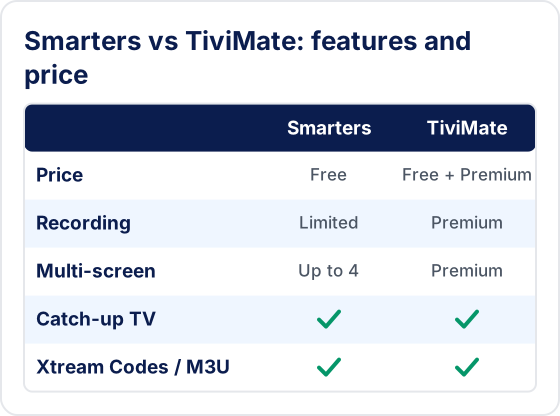
| Feature | IPTV Smarters Pro | TiviMate |
|---|---|---|
| Price | Free (core features) | Free + Premium (annual) |
| EPG Quality | Good | Best in class |
| Interface | Sectioned, mobile-style | TV-first, grid EPG |
| Customisation | Basic | Extensive |
| Recording (DVR) | Limited | ✓ With Premium |
| Catch-up TV | ✓ Supported | ✓ Supported |
| Multi-screen | ✓ Up to 4 streams | ✓ Multiview with Premium |
| Android TV / Firestick | ✓ Yes | ✓ Yes (its home turf) |
| iPhone / iPad | ✓ Smarters Player Lite | ✗ Not available |
| Samsung / LG Smart TV | ✓ Native apps | ✗ Not available |
| Windows / macOS | ✓ Desktop apps | ✗ Not available |
| Xtream Codes / M3U | ✓ Both | ✓ Both |
Guides for both: our complete IPTV Smarters Pro guide and device-by-device setup walkthrough cover Smarters, while our TiviMate hub covers installation, Premium, and the Downloader code.
Category-by-Category Winners
EPG & Daily Usability — TiviMate
TiviMate's grid EPG is the closest any IPTV player gets to a premium cable box: fast channel zapping, a clean programme guide you can scroll days ahead, and favourites that behave. Smarters' guide is perfectly usable, but its sectioned, mobile-derived layout means more clicks to do the same things on a TV remote.
Device Coverage — IPTV Smarters Pro
This is Smarters' trump card. TiviMate exists only on Android-based devices (Android TV, Firestick, Google TV). Smarters covers those plus iPhone and iPad (as Smarters Player Lite), native Samsung Tizen and LG webOS apps, and Windows/macOS desktops. If your household has an iPhone and a Samsung TV, Smarters isn't just the better choice — it's the only choice of the two.
Customisation & Power Features — TiviMate
Reorderable channel lists, custom groups, multiple playlists side by side, recording to local storage, catch-up integration, and layout controls — TiviMate Premium is built for people who tinker. Smarters keeps things simpler, which is either a limitation or a mercy depending on who's holding the remote.
Price — IPTV Smarters Pro (narrowly)
Smarters' core features are free; TiviMate's best features need Premium, a small annual fee. But keep perspective: the player fee is pocket change next to the subscription behind it, and a reliable provider matters ten times more than saving a few dollars a year on the player.
Multi-screen & Households — Both, with a Catch
Smarters can split the screen into up to four simultaneous streams on Android and Fire TV, free. TiviMate does the same with its multiview layouts, but only with Premium. Pair multi-screen with a multi-connection subscription plan and one TV can carry an entire afternoon of fixtures.
The Right Player for Each Device
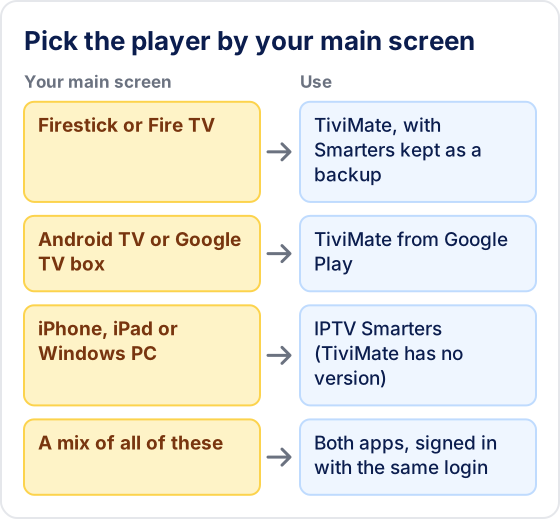
- Firestick / Fire TV — TiviMate first, Smarters as backup. See our Firestick IPTV guide.
- Android TV / Google TV box — TiviMate. Its EPG earns its keep on a big lineup.
- Samsung / LG Smart TV — Smarters (native app); TiviMate doesn't exist here. Setup in our Samsung guide.
- iPhone / iPad — Smarters Player Lite. See our iPhone IPTV guide.
- Windows PC / Mac — Smarters desktop app, or a browser player. See our Windows guide.
- Mixed household — both apps, one subscription with multi-connection support. Same credentials everywhere.
Can You Switch From Smarters to TiviMate Without Losing Anything?
Your channels come with you, but your personal setup does not. Both apps sign in with the same Xtream Codes login, so the channel list, VOD and guide reload in the new app from the provider. What stays behind is everything you set up yourself: favourites, hidden groups, channel order, parental PINs and player settings live inside each app and don't transfer.
- Sign in with Xtream Codes where you can. TiviMate then picks up the guide from the same login. With a plain M3U link you may need to add your provider's EPG link separately — see how to add a playlist to TiviMate.
- Rebuild favourites first. Ten minutes setting up a favourites group and hiding unused categories is what makes TiviMate feel fast on a remote.
- Watch the connection count. Keeping Smarters signed in on another device is fine, but both apps streaming at once use two connections on your plan.
What Do People Get Wrong When Comparing the Two?
The most common mistake is judging the players on things the provider controls. A fair comparison uses the same login, on the same device and connection, with the same channel.
- Blaming the app for buffering. If a channel stutters in both players, neither app is the cause.
- Thinking TiviMate Premium adds channels. Premium unlocks app features such as recording and extra playlists; the channels still come only from your playlist.
- Comparing different playlists. Testing Smarters with one provider and TiviMate with another compares the providers, not the apps.
- Looking for TiviMate on an iPhone or Samsung TV. It exists only for Android-based TV devices, and on Fire TV it is sideloaded with Downloader because it isn't in the Amazon Appstore.
Why the Subscription Matters More Than the Player
Here's the thing the player debate obscures: everything you actually watch comes from the subscription. Stream stability, channel selection, 4K availability, EPG completeness, peak-hour reliability — all provider-side. TiviMate's beautiful guide is only as good as the EPG data your provider feeds it; Smarters' four-way multi-screen is only as good as the servers behind those four streams.
Tivimate IPTV is built to make either player look its best: 55,000+ live channels with a complete 7-day EPG, 180,000+ VOD titles in 4K, multi-connection plans for mixed households, and Xtream Codes credentials delivered via WhatsApp in minutes — they drop into both apps identically. Plans from $19.99/month, no contract.
One Subscription, Both Players — Free for 24 Hours
Test Tivimate IPTV in TiviMate and Smarters side by side. 55,000+ channels, full EPG, no credit card.
Start Your Free Trial →Frequently Asked Questions
I have a Firestick — should I use TiviMate or Smarters?
TiviMate. On Android-based devices it's the more polished daily driver, and its EPG makes 55,000-channel lineups navigable. Keep Smarters installed as a backup player — it's free, and having a second app is the fastest way to diagnose whether a problem is your app or your provider. Our TiviMate guide covers setup end to end.
I have a Samsung/LG TV and an iPhone — what are my options?
That's Smarters territory: native Tizen/webOS apps for the TV and Smarters Player Lite on iOS. TiviMate doesn't exist on either platform. One Tivimate IPTV subscription covers all of them with the same Xtream Codes login — see our Samsung Smart TV and iPhone setup guides.
Does my choice of player affect stream quality or buffering?
Barely. Resolution, stability, and buffering are determined by your provider's servers and your connection — the player just renders what arrives. A better app gives you a better interface, not better streams. If streams stutter in both apps, the fix is a better subscription, not a third player. Our IPTV buffering guide explains the diagnosis.
What subscription works best with both apps?
Any provider issuing standard Xtream Codes credentials works in both. Tivimate IPTV is optimised for exactly this dual-app setup: 55,000+ channels with a full 7-day EPG (which is what makes TiviMate's guide shine), 4K streams, and multi-connection plans so the Firestick and the iPhone can stream at once. The 24-hour free trial lets you test it in both apps before paying.
Pick Your Player, Then Pick It a Worthy Backend
The honest verdict: TiviMate where it's available, Smarters where it isn't, and both in most real households. Neither costs enough to agonise over — spend the decision energy on the subscription instead, because that's what you'll actually be watching. Start a 24-hour Tivimate IPTV free trial, load it into whichever player fits your devices, and judge the streams yourself. Having trouble with Smarters right now? Our troubleshooting guide sorts app problems from provider problems. Questions? We're on WhatsApp 24/7.
Need a playlist for TiviMate?
Browse the plans