
IPTV Smarters Pro is one of the most widely used IPTV players — a free app that turns any device into a live-TV box once you connect a subscription. It supports Xtream Codes API and M3U playlists, has dedicated sections for live TV, movies, and series, and runs on more platforms than almost any competitor, including iPhone and Samsung/LG Smart TVs where players like TiviMate aren't available.
One thing to understand before installing: the app is empty on its own. IPTV Smarters Pro provides no channels — it plays whatever your IPTV provider's login unlocks. If you don't have a subscription yet, grab a free 24-hour Tivimate IPTV trial first so you have credentials to log in with.
IPTV Smarters Pro Features
- ✓ Xtream Codes API and M3U playlist login
- ✓ Live TV, Movies (VOD), and Series sections
- ✓ Full EPG TV guide with programme info
- ✓ Multi-screen — up to 4 streams at once on Android and Fire TV
- ✓ Catch-up TV support (where your provider offers it)
- ✓ External player support (VLC, MX Player)
- ✓ Parental controls with PIN lock
- ✓ Multiple playlist/account management
- ✓ Available on Android, Firestick, iOS, Windows, macOS, Samsung & LG Smart TVs
Quick Start — Getting Smarters Running
The short version: on Firestick you sideload the official APK via the Downloader app; on Android TV you sideload or use the Play Store where available; on iPhone/iPad you install Smarters Player Lite from the App Store; on Samsung/LG Smart TVs you install the native IPTV Smarters app from the TV's own store. Then log in with the Xtream Codes credentials (Server URL, Username, Password) from your IPTV provider, and your channels, VOD, and EPG load automatically.
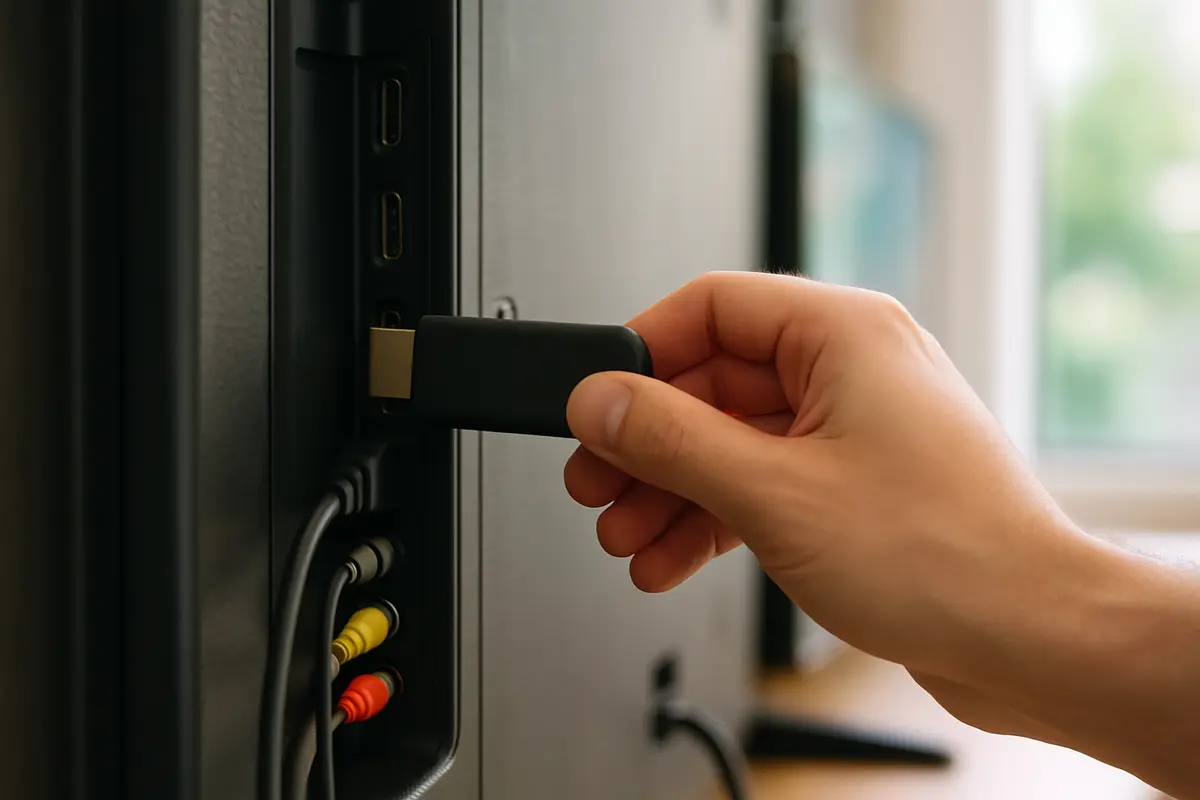
For the full click-by-click walkthrough on every device — including the Firestick Unknown Sources and Downloader steps — follow our dedicated IPTV Smarters Pro setup guide. One warning worth repeating here: only ever download the APK from the official developer's site. Modified Smarters APKs on random mirror sites are a genuine malware risk.
How Do You Log In to IPTV Smarters Pro with Xtream Codes or M3U?
Add a user, choose the Xtream Codes API login, and type the server URL, username and password exactly as your provider sent them. Use the M3U option only if your provider gave you a single playlist link instead.
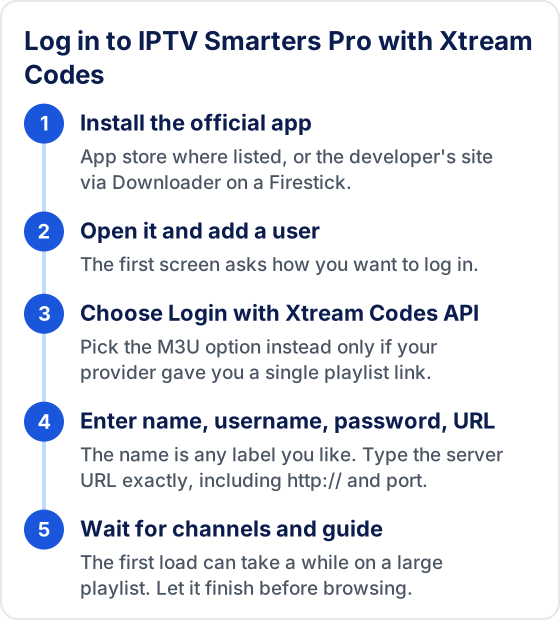
Pick Xtream Codes when you have the choice. It sorts content into Live TV, Movies and Series and pulls the TV guide from the same login, while an M3U link loads everything as one list and may need a separate EPG link before the guide fills in. Our explainer on Xtream Codes vs M3U logins covers the difference in more detail.
Most failed logins come down to the server URL. Copy it with the http:// or https://prefix and the port number if one was given, and don't add anything after it. Usernames and passwords are case-sensitive, and a space pasted at the end of any field is enough to fail.
Which IPTV Smarters Pro Settings Should You Check First?
Five settings fix most everyday annoyances. Labels move between versions and devices, so open the app's Settings and look for the option by what it does rather than an exact name.
- ✓ Stream format — if some channels refuse to play, switch between the formats on offer (such as MPEG-TS and HLS) and retest.
- ✓ Player — try the built-in player first; if playback stutters or has no sound, test an external player such as VLC or MX Player.
- ✓ Guide time offset — if every programme in the EPG is a few hours out, adjust the time shift instead of blaming the provider.
- ✓ Automatic refresh — let the app update channels and the guide when it starts, so new channels and listings appear without a manual reload.
- ✓ Parental PIN — lock adult or unwanted categories before children use the device.
Why Is IPTV Smarters Pro Not Loading Channels?
Usually it is a wrong login, an expired plan or a slow first download, not a broken app. Work out which one you have from the symptom, then fix that alone.
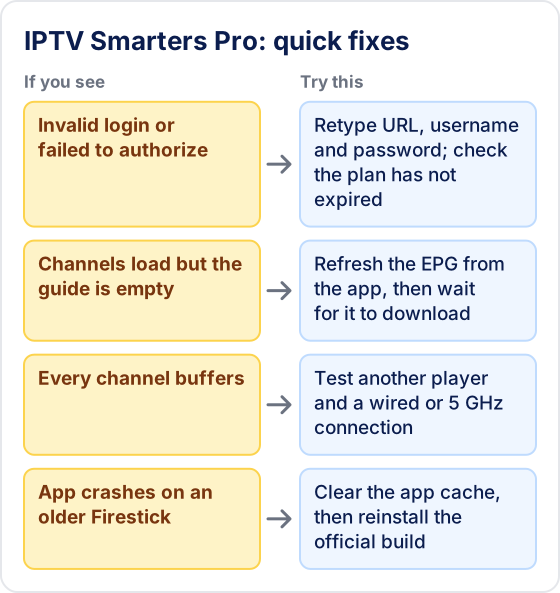
A useful test: sign in to a second player with the same details. If it fails there too, the problem is the login or the provider. If it works there, the problem is inside Smarters, and clearing its cache or reinstalling usually helps. The full list is in 10 fixes for IPTV Smarters Pro not working, and the exact authorization error has its own failed to authorize guide.
Is IPTV Smarters Pro the Right Player for You?
Choose Smarters if anyone in your home watches on an iPhone, iPad, smart TV or laptop, or if you want one app that looks the same on every screen. It is also the easier start for beginners because the login is a single form.

If you only watch on a Firestick or Android TV box and mostly flick between live channels, TiviMate's grid guide is quicker to use with a remote. Many people install both: TiviMate for daily viewing and Smarters as a free backup. The Smarters vs TiviMate comparison gives a device-by-device pick, and our roundup of IPTV player apps covers other options.
How Do You Keep IPTV Smarters Pro Safe and Up to Date?
Install it only from an app store or the developer's own website, and update it the same way. Copies labelled "unlocked" or "premium" on mirror sites are where malware usually hides, and they ask for the same login details you would give the real app.
A sideloaded copy on a Firestick does not update itself. When the app starts misbehaving after months of working, download the current build again from the official site and install it over the old one; your user profile is normally kept, but write your login details down first in case you need to add them again.
All Our IPTV Smarters Pro Guides
Setup Guide — Every Device
Step-by-step installation on Firestick, Android TV, iPhone, Windows, and Smart TVs, plus the Xtream Codes login flow.
IPTV Smarters Pro Review
Our full verdict on the app — features, pros and cons, and how it stacks up against the alternatives.
Smarters Not Working? 10 Fixes
Invalid credentials, no channels, buffering, empty EPG — and how to tell an app problem from a provider problem.
"Failed to Authorize" Error — 9 Fixes
What the authorization error actually means, the two variants of the message, and the exact fix for each.
IPTV Smarters vs TiviMate
The two most popular players compared, with a clear recommendation for each device type.
Connect a Subscription That Actually Performs
IPTV Smarters Pro is only as good as the subscription behind it — the app can't fix buffering streams, missing channels, or dead EPG data, because all of that comes from the provider. Tivimate IPTV works with Smarters: 55,000+ live channels, 180,000+ VOD titles, 4K on selected channels, Xtream Codes credentials delivered via WhatsApp in minutes. Start with the 24-hour free trial (no credit card) and see the difference a premium backend makes — plans from $19.99/month.
Frequently Asked Questions
Is IPTV Smarters Pro legal?
The app itself is a legal, neutral media player — like VLC. What matters legally is the content your subscription provides. See our is IPTV legal guide for the full picture.
Why was IPTV Smarters Pro removed from app stores?
The Play Store and App Store have periodically removed IPTV players over content-policy concerns. That's why sideloading the official APK (Android/Firestick) or using Smarters Player Lite (iOS) is the standard route. Only ever download from the official developer site.
IPTV Smarters Pro or TiviMate — which is better?
TiviMate has the superior EPG and customisation on Android/Firestick; Smarters wins on platform coverage (iOS, Smart TVs, desktop) and costs nothing. Full breakdown in our IPTV Smarters vs TiviMate comparison.
Why does IPTV Smarters Pro say 'invalid credentials'?
Usually a typo in the Server URL, Username, or Password (all case-sensitive), or an expired subscription. Our IPTV Smarters Pro not working guide walks through every fix in order.
Can I use the same Smarters login on several devices?
Yes, the same server URL, username and password work in Smarters on every device. How many can stream at the same time depends on the connection limit of your provider's plan, not on the app, so check that before watching on two screens at once.
Related: Smarters Not Working? · Smarters vs TiviMate · Top IPTV Players · XCIPTV
Try Tivimate IPTV
55,000+ live channels · 180,000+ movies and series · 4K on selected channels · No contract · From $19.99/month